
AI Video Ad Production: Generation Is the Easy Part

AI video ad production is the path from a campaign brief to an approved video that is ready for its placement. Generation is the fastest step on that path. The steps that decide whether the ad can run sit before and after it. They are the brief, the approved source material, storyboard approval, scene review, and the placement check, with rights confirmed at each.
A model can turn out drafts in minutes. What it cannot do is close the decisions that were still open when the prompt was written. A polished clip with an unclear offer or an inaccurate product still fails, and rights and placement decide whether it can run at all. A cut that cleared legal in a desktop preview and then gets cropped for vertical goes back through every review it already passed. The launch date moves with it.
The job is to carry the commercial intent from the brief through four outputs to final approval:
- CAMPAIGN BRIEF: The audience, goal, offer, key message, channel, and constraints.
- STORYBOARD: The approved concept, script, scene plan, and visual references.
- RENDERED SCENES: The generated or reused footage selected for the cut.
- FINAL CUT: The approved video, ready for its intended format and channel.
Each handoff carries forward what the team has approved and leaves open only what still needs a decision.
Start With Campaign Context
The brief records the campaign decisions: goal, audience, offer, key message, desired action, placement, and constraints. All of them are fixed before creative options multiply.
It also defines what success means for this asset. That may be a completed view, a qualified visit, a conversion, a cost per result, or another campaign metric. Once that is recorded, every creative decision can be judged against the media objective instead of against taste.
A prompt only describes an output; the brief records the commercial decision behind it. Starti's video brief template defines each field, and three filled-in examples show the template applied to an app, a product launch, and a B2B demo.
Before production begins, confirm five items:
- Commercial goal and intended audience
- Offer, product truth, and required claim support
- Primary message and desired viewer action
- Target channel, duration, aspect ratio, and safe zones
- Reviewers responsible for brand, legal, rights, and final approval
Build From Approved Context
The most useful source material has already passed a human decision: brand guidelines, product pages, approved copy, prior ads, product footage, music, and visual references. They carry product truth and earlier creative decisions into the next asset. That is why they belong at the start of production rather than as a fallback when generation misses.
Organize that material by brand and by usage rights. Record where each asset came from, which markets it may run in, what talent or voice permissions apply, and when any of that expires. Final review then checks a record instead of reconstructing one.
Starti AI DAM describes uploaded or synced media and splits video into searchable shots. A team can then place relevant library clips into a new storyboard before generating the scenes it does not have.
Approve Direction Before Rendering
The storyboard is the cheapest place to find a strategic mistake. Review the concept, script, and scene plan before the team commits to finished footage.
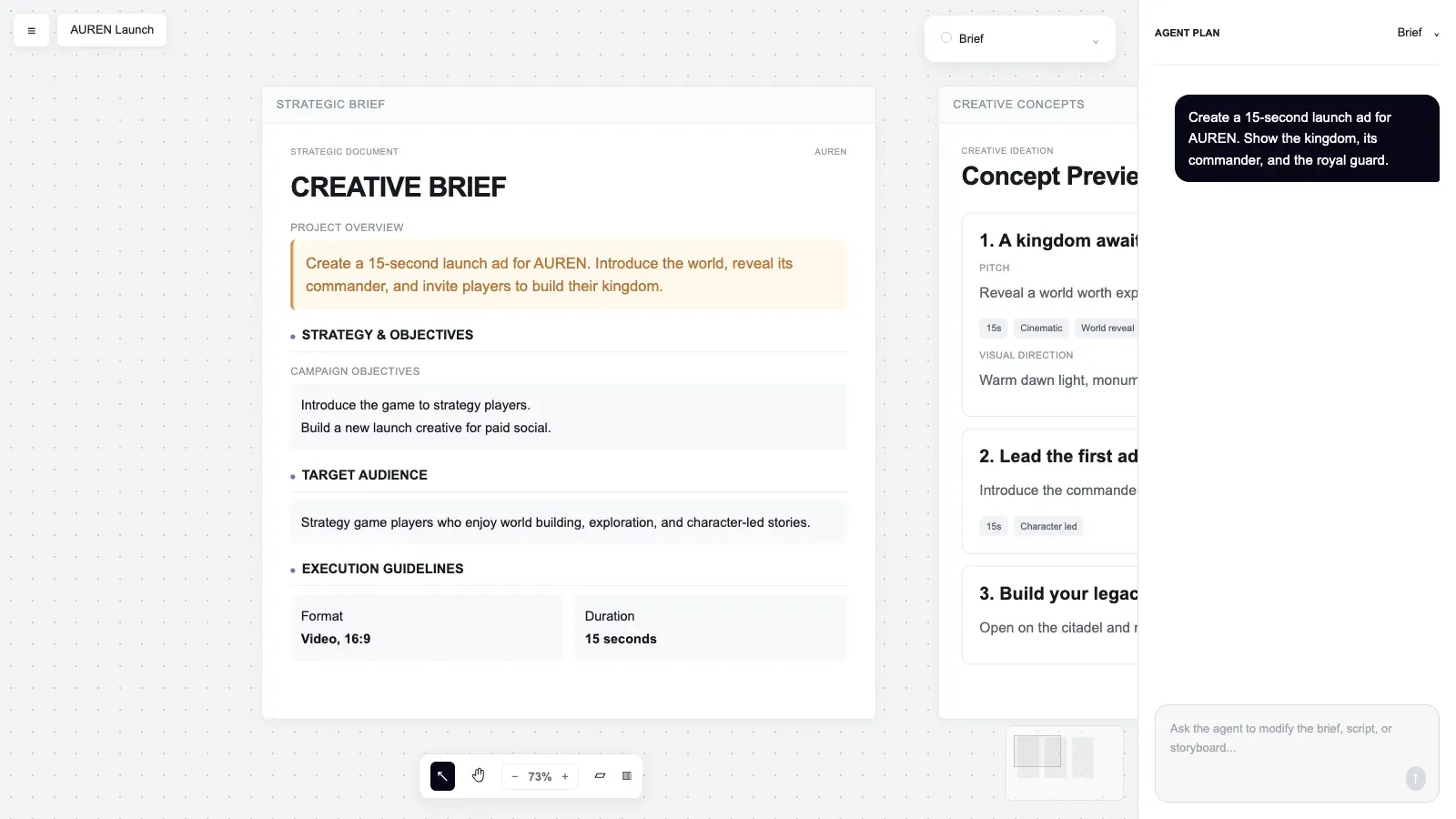
Make these decisions visible in the storyboard:
- Opening hook and first visual
- Sequence of product, proof, and offer
- Role of narration, on-screen text, and sound
- Product details that must remain accurate
- Scene references that define character, setting, camera, and tone
- Final action the viewer should take
Feedback at this stage should name the decision that has to change. “Try another version” creates another review round. “Move the offer earlier and keep the approved product shot” creates a controlled revision.
Once the storyboard is approved, editors have one direction to follow and reviewers have one record to judge later changes against.
Give Each Model a Job
Model choice follows the production requirement, because image, video, voice, language, and editing models each solve a different part of the asset. An image model can establish a character, a product, an environment, or a composition reference. A video model can animate approved frames or create a specific scene. Editing tools assemble the cut and prepare channel variants.
Judge each model on reference control, product fidelity, temporal consistency, editability, output rights, supported formats, and how much review its output needs. Keeping a product accurate across several scenes takes stable references and a reviewer who checks every scene.
Running several models inside one platform keeps those choices in one place. Starti AI Studio combines leading models, including GPT, Claude, Gemini, Seedance, and Kling, and selects the model suited to each task. The model decision therefore sits in the same project as the brief and the review, not in a separate tool with its own prompt history.
Starti's guide to AI video production after Images 2.5 and Seedance 2.5 looks at what stronger reference assets change in this step.
Review Scenes Before Assembly
Treat rendered scenes as production components and review them one at a time. A weak shot then stays a local problem instead of reopening the whole cut.
Scene review should cover:
- Product accuracy and brand consistency
- Character, object, and environment continuity
- Motion quality and visual artifacts
- Claim accuracy and disclosure requirements
- Talent, voice, music, trademark, and source-asset rights
- Text legibility, safe zones, duration, and channel specifications
The advertiser is responsible for the claims in the ad whether the footage was shot or generated. The Federal Trade Commission states that advertising claims must be truthful, fair, and supported by evidence. Nothing in that standard turns on how the footage was produced.
Rights get their own checkpoint because generated material raises several distinct questions at once. The U.S. Copyright Office addresses digital replicas, copyrightability, and AI training as separate policy questions. Final approval should confirm source rights, talent consent, likeness permissions, music licenses, and intended use for the asset in front of it. The AI generated ads approval checklist assigns each of those approvals to an owner and a stage.
Revise the Smallest Unit
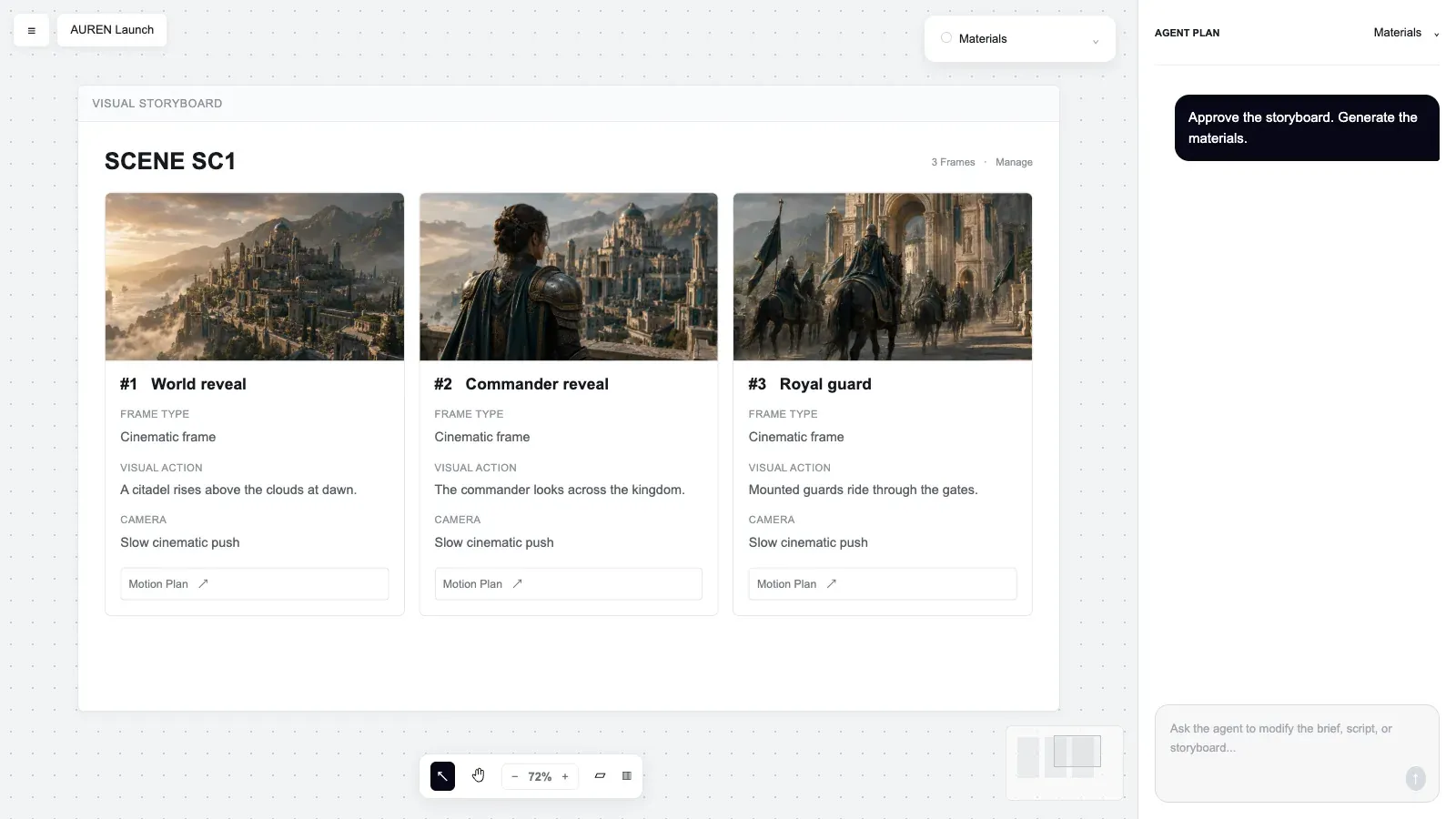
A revision stays cheap only when its scope is narrow. When a headline, a product shot, a voice line, or a scene needs attention, the request should target that element and leave accepted material alone. Reviewers can then compare the request with the new version without reopening every earlier decision.
Clear revision requests contain four parts:
- Exact scene or asset to change
- Observed problem
- Required outcome
- Elements that must remain unchanged
For example: “In scene three, replace the generic device screen with the approved product capture. Keep the camera movement, narration, timing, and surrounding scenes unchanged.”
Starti Video Agent keeps the campaign brief, storyboard, and final cut in one shared canvas, with concepts, scripts, and scenes reviewed alongside them. A selected scene can change while the approved work around it stays intact, so reviewers never re-approve work they already signed off.
Assemble for the Placement
The final cut is built for a specific placement. Assembly controls pacing, audio, visual continuity, product clarity, on-screen text, disclosures, and the call to action, and each of those depends on where the ad will run. So review each delivery format at its intended dimensions: a desktop preview can hide text that sits under a platform interface, or a subject that a vertical crop cuts off.
When a format is approved, record the file, version, reviewers, review date, permitted channels, markets, formats, and any expiration date. That record turns the approved cut into a master, and every later variant can be traced back to it.
Adapt Approved Work Carefully
One approved master can serve several placements, and each format may need changes to visual hierarchy, subject position, text area, edit rhythm, language, voice, or call to action. The rule for every variant is the same: keep the offer, product truth, and brand decisions, and change only what the placement requires. For app campaigns that need new variants every week, see mobile app video ads.
Localization is the variant that changes the most. It needs a native speaker or a qualified brand reviewer to check translation, tone, pronunciation, cultural context, on-screen text, claims, and local requirements. Talent or voice variations add a rights question on top. Use only consent the team already holds, and record where each variation can run and how long that permission lasts.
Measure Usable Output
Count approved output, not generations. Raw generation count says little about how much creative reached media activation or how much review it took to get there.
Useful operating measures include:
- Time from brief approval to final approval
- First-pass approval rate by stage
- Revision rounds per approved asset
- Number of approved variants by format and market
- Spend and performance by creative direction
Performance should enter the next brief as a documented decision: the element to test and the campaign signal behind the choice. Starti's guide to creative testing covers how to design that test and read the result.
Starti Smart Insight connects results from connected Meta, TikTok, Google Ads, and custom network accounts with the creative attributes of each ad. It surfaces findings once the account holds enough data for a comparison, so the next brief can name a tested element instead of a hunch.
Evaluate the Production Platform
A demo shows what a model can produce. Only a pilot on the team's own brief shows whether the platform fits how the team works. Starti's guide, How to Evaluate a Creative Automation Platform for Advertising, sets out six evaluation questions and a pilot record list. Add one more question: can the team use more than one model without leaving the brief, asset library, and review path?
Teams building a shortlist can also use Starti's review of seven AI video ad tools. To decide first whether the team needs a generator or a production platform, see AI video ad generator or production platform.
How Starti Supports Production
Starti AI Studio is built around this path. The brief, storyboard, scenes, and final cut live in Video Agent's shared canvas. AI DAM feeds approved assets into the storyboard, Smart Insight turns connected account results into the next test, and the platform selects among several leading models for each task. Every stage waits for the team's approval.
Bring a current brief to a demo with Starti and walk it through this path.
Frequently Asked Questions
What is AI video ad production?
AI video ad production uses AI across planning and production: concepts, scripts, storyboards, scenes, editing, revision, adaptation, and analysis, with human reviewers approving each stage.
What should an AI video brief include?
The campaign goal, audience, offer, message, desired action, placement, format, approved assets, claim support, rights constraints, and named reviewers. Starti's video brief template defines each field.
Can AI video ads run immediately?
No. Every asset should pass brand, factual, legal, rights, quality, and channel review before activation, and regulated categories and some platforms add review steps of their own.
How should teams review AI video?
Approve the concept and storyboard first. Review each rendered scene for accuracy, continuity, rights, and technical quality. Then approve every intended final-cut format.
What reduces AI video revisions?
Supply approved brand context and specific reference assets, approve the storyboard before rendering, and write each revision request around the smallest change with a clear list of what must stay.
How should performance influence production?
Turn the performance signal into one specific next test. Record the creative element, the expected effect, and the metric that will judge it, and hold the other variables steady.
What changes with new AI models?
New models can improve reference control, motion, fidelity, or editing options. The production path still needs an approved brief, source material, review gates, rights checks, and final approval. A platform that runs several models lets a team adopt a new one for a single task without changing the brief or the review path.