
Video Brief Template: How to Write a Brief That Survives AI Production

A video brief for an AI video ad is a decision record for production. It defines what the ad must achieve, who it is for, what it can claim, where it will run, which assets it may use, and who can approve it. To write one that survives production, resolve the campaign decision in one sentence and complete the twelve fields of the video brief template. Settle claims, placement, and rights before the storyboard expands.
Generative AI can multiply creative options faster than a team can resolve the decisions behind them. A one-line prompt may produce a polished clip. It cannot decide whether the offer is commercially useful, whether the claim is supported, whether the footage is cleared, or whether the cut fits the placement.
Scripts, storyboards, generated scenes, and revisions then share one source of truth: the brief. Review moves faster because everyone can see which decisions are fixed and which variable is still open. Starti's AI video ad production guide follows that record from campaign context to an approved asset.
Prompts Describe Output While Briefs Preserve Intent
A prompt tells a model what to produce next: a subject, a shot, a style, a duration, a voice, an edit. The brief explains why that output should exist and the limits it must respect.
When the brief is incomplete, whoever is producing has to fill in the missing decisions. One script emphasizes awareness while another pushes an offer.
A vertical cut hides the product interface. A generated spokesperson raises rights questions nobody has answered. Reviewers end up debating strategy after production has already expanded, and the media plan waits.
Those questions get closed in the brief, before creative options multiply. The prompt era left them open.
The Brief Must Resolve the Campaign Decision
Begin with one sentence that combines the audience, problem, offer, and desired action. If the team cannot agree on that sentence, it is too early to write the script.
For example:
“Show US subscription app users who track recurring charges manually that the product gives them one place to review upcoming renewals, then ask them to start a free trial.”
The hook, visual treatment, and script stay open, but they now sit inside a commercial boundary.
Then name the test variable: the one element the team wants to learn about, such as the opening hook, product demonstration, proof sequence, spokesperson treatment, or call to action.
Use This Video Brief Template
Complete the template before concept development, and keep each answer short enough that a producer, media buyer, reviewer, or the production platform can use it without interpretation.
- Campaign goal: The business or media outcome this asset should support. Name the primary objective and the event used to evaluate it.
- Audience: The specific group, situation, awareness level, and relevant tension. Avoid a broad demographic label with no buying context.
- Offer: What the viewer receives or can do. Include price, trial, promotion, or eligibility only when approved.
- Desired action: The single next step the viewer should take and the landing destination that must match it.
- Primary message: One sentence the viewer should understand after watching. Keep supporting points subordinate to it.
- Proof and claim support: The product evidence, approved data, demonstration, case study, or qualification that supports each objective claim.
- Placement and delivery: Channel, ad format, duration, aspect ratio, resolution, safe zone, caption, audio, and file requirements.
- Brand direction: Approved tone, logo use, colors, typography, product presentation, and visual boundaries.
- Approved assets: Product captures, footage, images, audio, copy, prior ads, and references that may enter production.
- Rights and restrictions: Source, owner, permitted markets and channels, talent or voice consent, license terms, and expiration dates.
- Review path: The named owners for strategy, product accuracy, brand, claims, rights, media, and final approval.
- Measurement and next test: The primary result, the test variable, and the decision the result should inform.
Placement, claims, and rights shape the script and the scene plan. When they surface for the first time in final review, finished work gets rebuilt.
Write Claims Before Writing Scenes
The brief should list every product or performance claim the ad may communicate, including the implied claims the visuals make, and name the evidence, qualification, or approved source behind each one.
In the United States, the Federal Trade Commission's advertising substantiation policy requires advertisers to have a reasonable basis for objective claims before those claims are disseminated. That puts claim support before the script, not after the render. A reviewer should be able to compare the script and scenes with the approved evidence before the final cut exists.
Visuals deserve the same attention as spoken or written copy. A generated product screen, customer reaction, comparison, or before-and-after sequence can say more than the script does. The brief should state which demonstrations are literal, which scenes are illustrative, and which product states must match the real experience.
For every approved claim, record:
- Exact language or permitted range of language
- Evidence or product source that supports it
- Required qualifications or disclosures
- Markets or channels where the claim may run
- Reviewer who can approve any change
This record keeps a creative rewrite from quietly becoming a new claim.
Choose the Placement Before the Storyboard Expands
The target placement changes composition, pacing, sound, text area, and the role of the call to action. A brief that says only “social video” leaves those open.
Google Ads evaluates video creative on attributes including early logo presence, objective-based duration, voice-over, and whether an ad group includes horizontal 16:9, vertical 9:16, and square 1:1 assets. Its video creative guidance and video ad specifications set different length and text limits by campaign type.
No storyboard can serve three orientations equally, so the brief has to say which placement is primary. If the campaign also needs other formats, it states whether the team will reframe an approved master or create placement-specific versions. It then defines what must stay the same across every version: the offer, the product truth, the required disclosure, and the primary message.
The placement line can read like this:
“Primary delivery is a 15-second vertical cut for Reels and Shorts. Keep the product demonstration and call to action inside the approved safe area. Produce a 16:9 YouTube version from the same approved concept after the vertical storyboard is signed off.”
Name the Exact Assets That May Enter Production
The brief should point to the exact files that can enter production. A folder name is not enough when the folder holds outdated logos, expired music, rough product screens, or footage cleared for a different market.
List each source asset with its owner, approved use, market, and expiration date, and mark which assets are mandatory, preferred, optional, or reference only. A product capture that must stay accurate plays a different role from a mood reference that only influences lighting.
AI adds questions around voice, likeness, and authorship. The U.S. Copyright Office's AI initiative treats digital replicas, copyrightability, and training as separate policy areas. Final reviewers have to judge each of them for the intended use, and they can only do that if the brief keeps source and permission information in view.
For teams with large libraries, Starti AI DAM makes owned footage searchable and lets selected clips enter a new storyboard.
Turn the Brief Into Review Gates
A brief only changes production if each stage has an approval question tied to it, and that review starts before any finished scene exists.
Use four gates:
- Brief approval: Is the campaign decision complete, supported, and ready for creative development?
- Direction approval: Does the concept and script express the approved message, proof, and action?
- Storyboard approval: Does the scene plan preserve product truth, placement requirements, and rights constraints?
- Final approval: Does each rendered scene, and then the finished asset, match the approved direction and pass brand, claim, rights, quality, and channel review?
Each gate needs a named owner and a visible status. Media confirms format and call to action, product marketing owns accuracy, legal or compliance reviews claims, and brand approves visual treatment. Final approval confirms that those decisions converge on the exact delivery file.
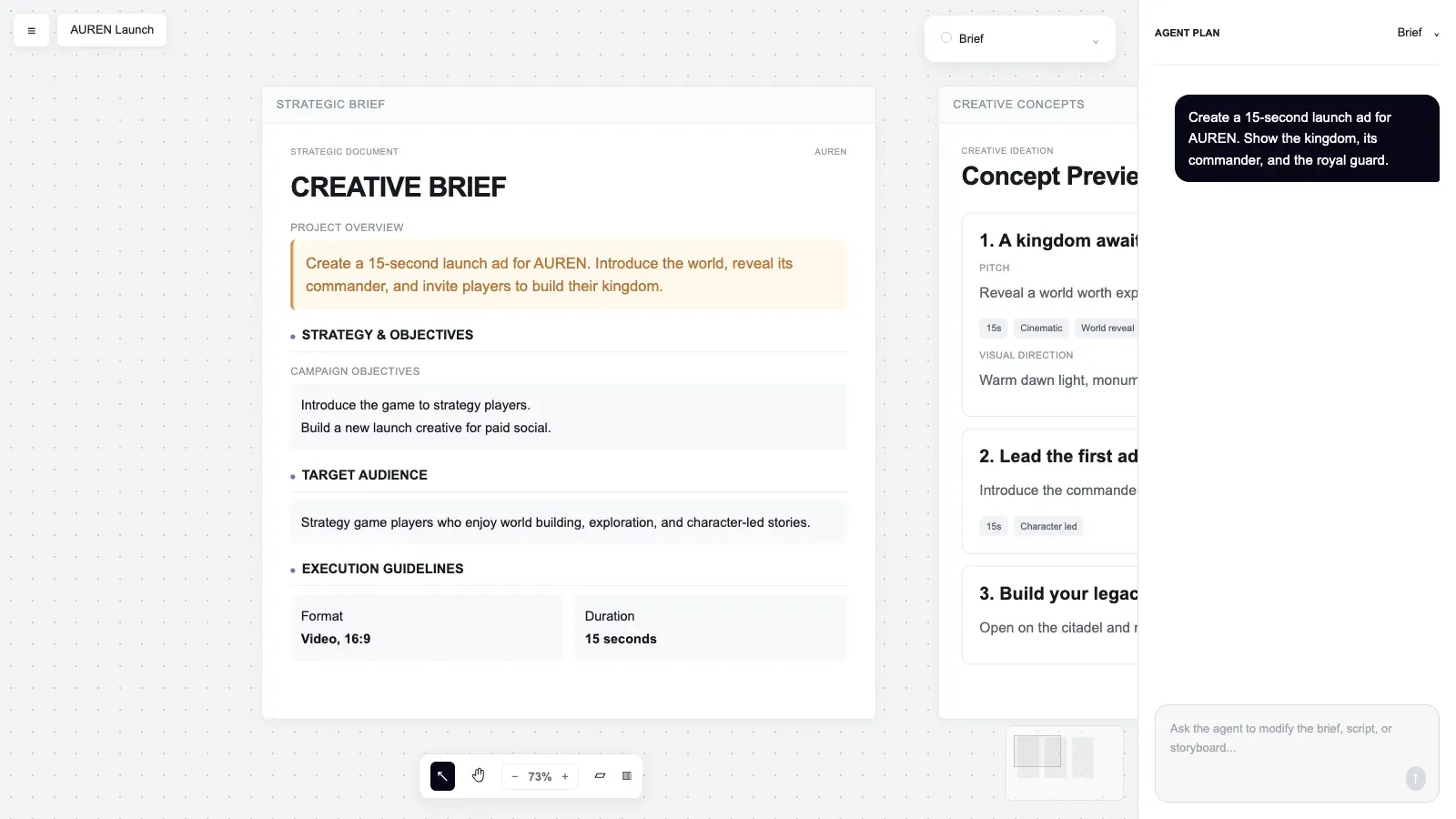
In Starti Video Agent, these gates sit inside one project. The brief, concept options, storyboard, and cut are reviewed on the same canvas. A revision touches only the element it names, so approved scenes do not come back for a second review.
Write Revision Requests Against the Brief
“Make it more engaging” hands the production team another open-ended task. A revision request that can be acted on names the scene or asset and states the problem in relation to the brief. It describes the required result and lists the approved elements that must stay unchanged.
For example:
“In scene two, move the product demonstration after the recurring-charge setup. Keep the approved narration, offer, visual style, duration, and call to action unchanged.”
The AI video ad production guide covers the four-part revision request and scene-level review in detail.
Carry One Learning Into the Next Brief
The measurement field should name the result that matters, the test variable, and the decision the result will inform.
For a hook test, record the tested opening, the comparison condition, the primary metric, and the threshold for making the next decision. Change one variable per test.
The next brief then states the learning as a production instruction. For example: “Keep the direct product opening that earned the stronger qualified-visit rate. Test proof order next.”
Keep the Brief Short Enough to Use
A video brief does not need to contain the complete script, storyboard, or media plan. Its job is to preserve the decisions those outputs depend on.
It also does not need to name a generation model. On a multi-model platform such as Starti AI Studio, the model is a production choice made against the brief rather than a field inside it.
A simple campaign may fit on one page. A regulated or multi-market campaign may need attached claim, rights, or localization records. The test is whether production and review can move forward without reopening the campaign fundamentals.
Teams evaluating software for this workflow can use Starti's guide to choosing a creative automation platform. The question to test is whether the platform carries the approved brief into concepts, storyboards, revisions, and final delivery, or treats every generation as a separate prompt.
Bring your current brief, finished or not, to a demo with Starti and see where the workflow picks it up.
Frequently Asked Questions
What is an AI video ad brief?
A decision record that fixes the campaign goal, audience, offer, message, proof, placement, assets, rights, review path, and measurement plan before production begins.
How is an AI video brief different from a prompt?
A prompt describes the next output. The brief holds the commercial intent, evidence, constraints, and approvals that every output has to follow.
Can this replace a general creative brief template?
Yes, for AI video ads. This video creative brief template covers the goal, audience, offer, message, and action fields of a general brief, then adds proof, placement, rights, review path, and a test variable, which AI video production needs fixed before generation.
How long should an AI video ad brief be?
As short as it can be while still resolving the decisions production needs. Many campaigns fit a one-page brief with linked evidence and asset records. Regulated or multi-market work may need supporting documents.
What should be approved before video generation?
Everything in the template, then the concept and storyboard before full rendering.
Should every format use the same video?
Use one approved concept when the message should stay consistent, but review each placement at its intended dimensions. Reframing may change composition, text area, pacing, sound, or the call to action.
How should performance data enter the next brief?
Record the result, the creative variable being evaluated, the limits of the evidence, and the next decision. Carry one clear learning forward and keep unrelated changes out of the same test.