On this page
- YouTube video ad specs: File requirements
- Ad length by YouTube format
- YouTube pre-roll ad specs (skippable in-stream)
- Bumper and non-skippable ad specs
- YouTube Shorts ad specs
- In-feed video ad specs
- Demand Gen video and image specs
- Masthead, pause ads, and companion banner specs
- YouTube TV ad lengths
- AI labels on YouTube ads
- YouTube ad export checklist
- Cutting one ad for every YouTube format
- Frequently asked questions
YouTube ad specs start with one rule that applies to every video format: the ad must be a video uploaded to YouTube and set to public or unlisted. Google's video ad specs page then recommends 1080p files in three shapes, 1920 x 1080 for horizontal, 1080 x 1920 for vertical, and 1080 x 1080 for square, with files up to 256 GB. Length is where the formats split: bumpers stop at 6 seconds, standard non-skippable ads run 7 to 15 seconds, and skippable in-stream ads have no maximum.
Google fits each video to the viewer's screen without stretching it or cutting it off. Each format sets its own length, text fields, and aspect ratios, and Google publishes one safe-area template each for horizontal, vertical, and square video.
YouTube video ad specs: File requirements
Every in-stream, bumper, Shorts, and in-feed video ad shares the same file requirements:
- Resolution: 1080p recommended (1920 x 1080, 1080 x 1920, 1080 x 1080). Google accepts 720p, with minimums of 1280 x 720, 720 x 1280, and 480 x 480, and does not recommend SD.
- Aspect ratio: 16:9, 9:16, and 1:1 recommended. Google's spec table also accepts 4:3, 2:3, and 4:5.
- Format: .MPG (MPEG-2 or MPEG-4) recommended, with MP4, MOV, WebM, ProRes, and HEVC among the accepted formats. Audio-only files such as MP3 or WAV can't be used.
- File size: up to 256 GB.
- Hosting: uploaded to YouTube as public or unlisted. An unlisted video used as an ad runs without the channel logo, name, or information.
- Thumbnail: 1280 x 720 recommended, under 2 MB.
Google's ad policy for video ads also requires a name or logo in the video that clearly represents the advertiser, product, or service.
Ad length by YouTube format
The biggest difference between YouTube ad formats is length:
- Skippable in-stream: any length, with a Skip Ad button after 5 seconds.
- Bumper: up to 6 seconds, non-skippable.
- Non-skippable in-stream: 7 to 15 seconds, or 16 to 30 seconds on TV screens.
- Shorts ads: up to 3 minutes, with the first 60 seconds playing in the Shorts feed and under 60 seconds recommended; viewers swipe past.
- In-feed video: any length; viewers click the thumbnail to watch.
- Demand Gen video: 10 to 60 seconds recommended, 5 seconds minimum.
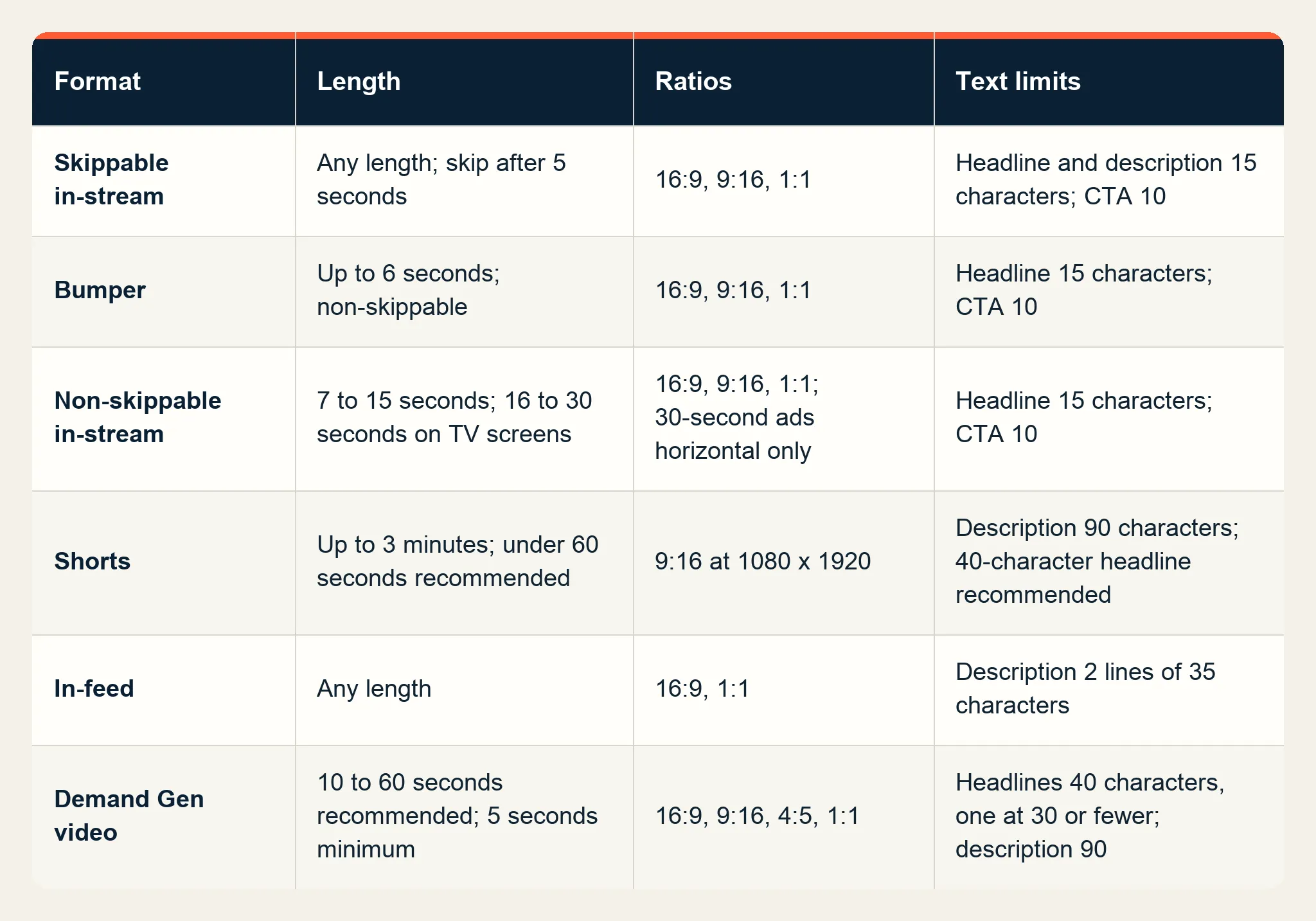
Google's ad formats page recommends keeping skippable ads under 3 minutes. Its skippable in-stream page suggests 15 to 20 seconds for awareness and action goals and 2 to 3 minutes for consideration. Reservation campaigns set a range of their own: 12 seconds to 6 minutes for a skippable in-stream ad.
YouTube pre-roll ad specs (skippable in-stream)
Skippable in-stream ads run before, during, or after other videos on YouTube and on Google video partner sites and apps, which covers pre-roll, mid-roll, and post-roll. Viewers can skip after 5 seconds.
- Aspect ratio: 16:9, 9:16, or 1:1.
- Text: headline and description up to 15 characters each, and a call to action up to 10 characters.
- Companion banner: the 300 x 60 desktop banner described below.
Bumper and non-skippable ad specs
Up to 6 seconds long, bumper ads can't be skipped and take the same 16:9, 9:16, and 1:1 shapes as other in-stream ads. Google bills them on target CPM, and their viewers can't be added to remarketing lists. Google recommends them for reaching people broadly with a short, memorable message.
Non-skippable in-stream ads come in three lengths:
- Bumper: 6 seconds or shorter. A non-skippable video of that length runs as a bumper.
- Standard non-skippable: 7 to 15 seconds.
- Thirty-second non-skippable: 16 to 30 seconds, shown on connected TVs, and horizontal only. Square and vertical versions of this length won't run.
Google's video ad policy caps non-skippable ads at 30 seconds in the auction and 60 seconds in reservation campaigns. Headlines take up to 15 characters and calls to action up to 10. A Video reach campaign can mix 6-second, 15-second, and 30-second ads.
YouTube Shorts ad specs
In the vertical feed, YouTube Shorts ads play between Shorts, and viewers move past them with a swipe. Google's Shorts asset guidance recommends vertical video:
- Aspect ratio and size: 9:16 at 1080 x 1920. Horizontal and square videos are supported too; horizontal videos run with blurred bars above and below in the vertical feed, and in brand campaigns vertical videos get priority.
- Length: up to 3 minutes; the Shorts feed plays the first 60 seconds, and Google recommends under 60 seconds. For action-oriented ads, Google suggests 10 to 30 second vertical videos. Google suggests 6 to 60 second videos for Video reach campaigns and 10 to 60 second videos for other campaign types.
- Text: the channel name plus a description of up to 90 characters. Google recommends adding a 40-character headline as well.
- Call-to-action button: appears 3 seconds in for Performance Max, App, and Demand Gen campaigns, and 10 seconds in for Video view and Video reach campaigns.
In a 1080 x 1920 file, Google's vertical safe-zone template reserves 288 pixels at the top, 672 at the bottom, 192 on the right, and 48 on the left for the channel name, caption, buttons, and calls to action. Logos, products, and on-screen text go in the space inside those margins, and the same page links transparent PNG templates for horizontal and square videos.
Shorts ads serve on phones, tablets, desktop, and connected TVs. On a TV the ad can't be clicked, so a QR code carries viewers to the destination; the commercial script guide on Starti covers where the call to action belongs once QR codes appear on connected TV screens. Lead forms don't work with Shorts ads.
In-feed video ad specs
Each ad is a thumbnail from the video with some text, and it invites viewers to click and watch. It appears in YouTube search results, next to related videos, on the mobile Home feed, and at the top of the Subscriptions tab. Google's in-feed page sets these specs:
- Aspect ratio: 16:9 or 1:1 recommended. In Video reach campaigns, vertical videos don't serve on in-feed inventory.
- Length: any. Google suggests 15 to 20 seconds for awareness and 2 to 3 minutes for consideration, and a video needs 12 seconds or more to build remarketing lists.
- Text: a description of up to two lines of 35 characters each, which does not appear on the YouTube watch page on desktop or on TV.
- Thumbnail: one of four frames from the video, or a custom thumbnail set in YouTube Studio.
With Playback in feeds on, the video can autoplay with sound off and captions on.
Demand Gen video and image specs
Google's Demand Gen campaigns run across YouTube in-stream, in-feed, and Shorts, plus Gmail and Discover. All Video action campaigns were upgraded to Demand Gen by May 2026, so action-focused YouTube video now runs on the Demand Gen specs:
- Ratios: recommended sizes of 1920 x 1080 for 16:9, 1080 x 1920 for 9:16 (recommended for Shorts), 1080 x 1350 for 4:5, and 1080 x 1080 for 1:1.
- Length: 10 to 60 seconds recommended, 5 seconds minimum. Videos under 10 seconds can't serve as in-stream ads.
- Text: headlines up to 40 characters, with at least one of 30 characters or fewer; long headline and description up to 90 characters; business name up to 25.
- Images: recommended sizes of 1200 x 628 (1.91:1), 1200 x 1200 (1:1), 960 x 1200 (4:5), and 1080 x 1920 (9:16), each up to 5 MB.
Masthead, pause ads, and companion banner specs
Both Masthead and Pause ads are reservation buys, while the companion banner sits beside in-stream and bumper ads on desktop:
- Masthead: the top of the YouTube Home feed. Google recommends a 16:9 video at 1920 x 1080 or higher and longer than 10 seconds. On desktop the video autoplays muted for up to 30 seconds, and on mobile it autoplays muted for its full length. Mastheads on TV screens carry no call to action.
- Pause ads: static images on connected TVs that appear 10 seconds after a viewer pauses a video. Google recommends images 1080 to 1350 pixels on each side, in PNG or JPG up to 2 MB, with a tagline of up to 70 characters.
- Companion banner: 300 x 60 pixels, JPEG, GIF (under 5 frames per second), or PNG, up to 150 KB, for skippable, non-skippable, and bumper ads, or generated automatically from the YouTube channel. It shows on desktop only, and a click on it counts as a view. Overlay ads, a legacy desktop-only format, stopped running on April 6, 2023.
YouTube TV ad lengths
On YouTube TV, the US live TV subscription service, non-skippable in-stream ads come in four lengths: up to 6 seconds, up to 15 seconds, 30 seconds, and 60 seconds. A 30-second or 60-second ad must be within 1 second of its expected length to serve: a spot cut at 29.5 seconds fits a 30-second slot, and one cut at 28 seconds does not.
AI labels on YouTube ads
Since July 2026, Google Ads has offered an AI label setting for assets generated or edited with AI, and ads with assets marked this way show a visible overlay when campaigns target the European Union, India, or New York. Google's July 9, 2026 policy update also lets advertisers add text or visual AI labels inside image and video creatives without breaking its rules on text overlays and watermarks.
YouTube ad export checklist
Check each file against the format before upload:
- Export 1080p in each ratio the campaign uses: 16:9 for in-stream and TV, 9:16 for Shorts, 1:1 or 4:5 where Demand Gen serves them.
- Cut 6-second, 15-second, and 30-second versions for bumper and non-skippable buys, with the 30-second cut horizontal.
- Keep logos, offers, and captions inside the safe area of Google's template for each ratio, with the advertiser's name or logo visible in the video.
- Write in-stream headlines to 15 characters and Demand Gen headlines to 40, keeping at least one Demand Gen headline at 30 characters or fewer.
- Use the companion banner generated from the YouTube channel, or upload a 300 x 60 image, for desktop in-stream and bumper ads.
- Upload each file to YouTube as public or unlisted.
For TikTok's sizes and safe zones, see Starti's TikTok ad specs guide.
Cutting one ad for every YouTube format
In Video Agent, part of Starti AI Studio, a finished video can be reframed to 9:16, 16:9, 1:1, and 4:5 with subject-aware cropping, so one approved ad becomes the horizontal in-stream cut, the vertical Shorts cut, and the square and 4:5 versions Demand Gen uses.
Teams that want Starti to produce the ads can use Creative Studio, the managed production service. Its team prepares 6-second, 15-second, and 30-second cuts, with the story and call to action adapted to each length, and adapts the video for vertical, square, and widescreen placements as agreed in the brief.
Book a demo to turn one approved ad into YouTube versions with Video Agent.
Frequently asked questions
What size and format should a YouTube video ad be?
Google recommends 1080p: 1920 x 1080 for horizontal, 1080 x 1920 for vertical, and 1080 x 1080 for square, in a file up to 256 GB, with .MPG (MPEG-2 or MPEG-4) as the recommended format. Every video ad is uploaded to YouTube as public or unlisted.
How long can a YouTube ad be?
Skippable in-stream and in-feed ads have no maximum length, and Google recommends keeping skippable ads under 3 minutes. Bumpers run up to 6 seconds. Non-skippable ads run 7 to 15 seconds, or 16 to 30 seconds on TV screens, with 60 seconds allowed in reservation campaigns.
What size is a YouTube Shorts ad?
A vertical 9:16 video at 1080 x 1920 pixels. Shorts ads can run up to 3 minutes, with the first 60 seconds playing in the Shorts feed, and Google recommends under 60 seconds, or 10 to 30 seconds when the ad asks viewers to act.
What is the YouTube companion banner size?
A companion banner is 300 x 60 pixels, in JPEG, GIF, or PNG, up to 150 KB. It appears on desktop only, next to skippable, non-skippable, and bumper ads.
Can YouTube ads be vertical?
Yes. Shorts ads work best in vertical 9:16, the shape Google recommends for them, and in-stream ads accept it too. In Video reach campaigns, vertical videos don't serve on in-feed inventory, and the 30-second non-skippable format must be horizontal.
What are the types of YouTube ads?
Skippable in-stream, non-skippable in-stream, bumper, Shorts, in-feed, Masthead, and Pause ads, plus Demand Gen campaigns that run video across YouTube, Gmail, and Discover.
What is the difference between bumper ads and non-skippable ads?
Bumper ads are non-skippable ads of 6 seconds or shorter. Standard non-skippable ads run 7 to 15 seconds, and a 30-second non-skippable version serves mainly on connected TVs.