On this page
- How to create Instagram Stories ads
- How to create Instagram Reels ads
- Boosting a reel or story from Instagram
- Instagram ad specs for Stories and Reels
- Instagram Stories and Reels safe zones
- Reels trending ads
- What Meta recommends for Stories creative
- Producing vertical versions with Starti
- Frequently asked questions
Instagram Stories ads play between people's organic Stories, and Reels ads sit between reels in the Reels tab. Both placements fill the screen with a 9:16 video and are set up in Meta Ads Manager. Reels alone take up more than half of all time spent on Instagram.
The two share a frame, but the viewing differs. Stories are tapped through one card at a time, while a Reels ad can be liked, commented on, shared, or skipped like any other reel. One 9:16 master can serve both if it is short enough for Stories to play in full, carries its message in the video rather than the primary text, and keeps text inside the safe zone both placements share.
How to create Instagram Stories ads
Running ads on Instagram takes an Instagram account. From there, the setup runs through Meta Ads Manager:
- Click + Create campaign and choose the objective closest to the business goal.
- Name the campaign, then set the budget, schedule, audience, and placements.
- Under Ad setup, pick Flexible, Single image or video, Carousel, or Collection.
- Add media, text, and a destination in Ad creative. Stories templates turn a still image into a vertical animation.
- Click Select a placement to edit, choose Instagram stories, and adjust the creative for that placement.
- Complete the ad and click Publish. The ad preview includes a Stories and reels view.
Stories ads support a default call-to-action sticker at the bottom of the frame. On 9:16 ads, its position, size, and color can be adjusted in the ad creative section.
How to create Instagram Reels ads
Reels ads work with six objectives: Awareness, Traffic, Engagement, Leads, App promotion, and Sales. Leaving Advantage+ placements on adds Reels automatically; to pick placements by hand, open Show more settings in the Placements section and select Instagram reels. Once approved, the ads can run in the Reels tab and in the feed view of the Reels tab on public profiles of people 18 and older.
Meta also sets a few content rules for Reels ads:
- Music: no licensed tracks. Use original audio or royalty-free music from Meta's Sound Collection instead.
- Post date: reels published before October 15, 2021 shouldn't be used.
- Effects and tags: leave out face or camera effects, GIFs, and product tags.
Sound is strongly recommended. With 44 characters of recommended primary text, the message belongs in the video itself, spoken or shown on screen. Test different kinds of video as well, from joining trending moments through challenges to tutorials and product education.
Boosting a reel or story from Instagram
An existing reel or story can also be boosted straight from the Instagram app or instagram.com, with a goal, audience, daily budget, and duration. Boosting has tighter limits than Ads Manager:
- Reels: a boosted reel must run 90 seconds or less in full-screen 9:16, use no licensed music, and not already be shared to Facebook. It then shows in the Reels tab, Explore, Feed, and Stories.
- Stories: a boosted story has to be a single card that is active, featured in highlights, or reposted from the archive, without polls, quizzes, music, or link stickers. It can carry one interactive element, such as a location, countdown, or @mention sticker, or up to five in a partnership ad. If the story has no sticker or interactive element, a link can be added as an action button when the ad is created.
A boosted story keeps running for the set duration even after the original expires. For Reels ads longer than 90 seconds, or for ads built from new files rather than existing posts, Ads Manager is the route. Boosting suits a post that has already done well organically, since those results are a first test of the creative.
Instagram ad specs for Stories and Reels
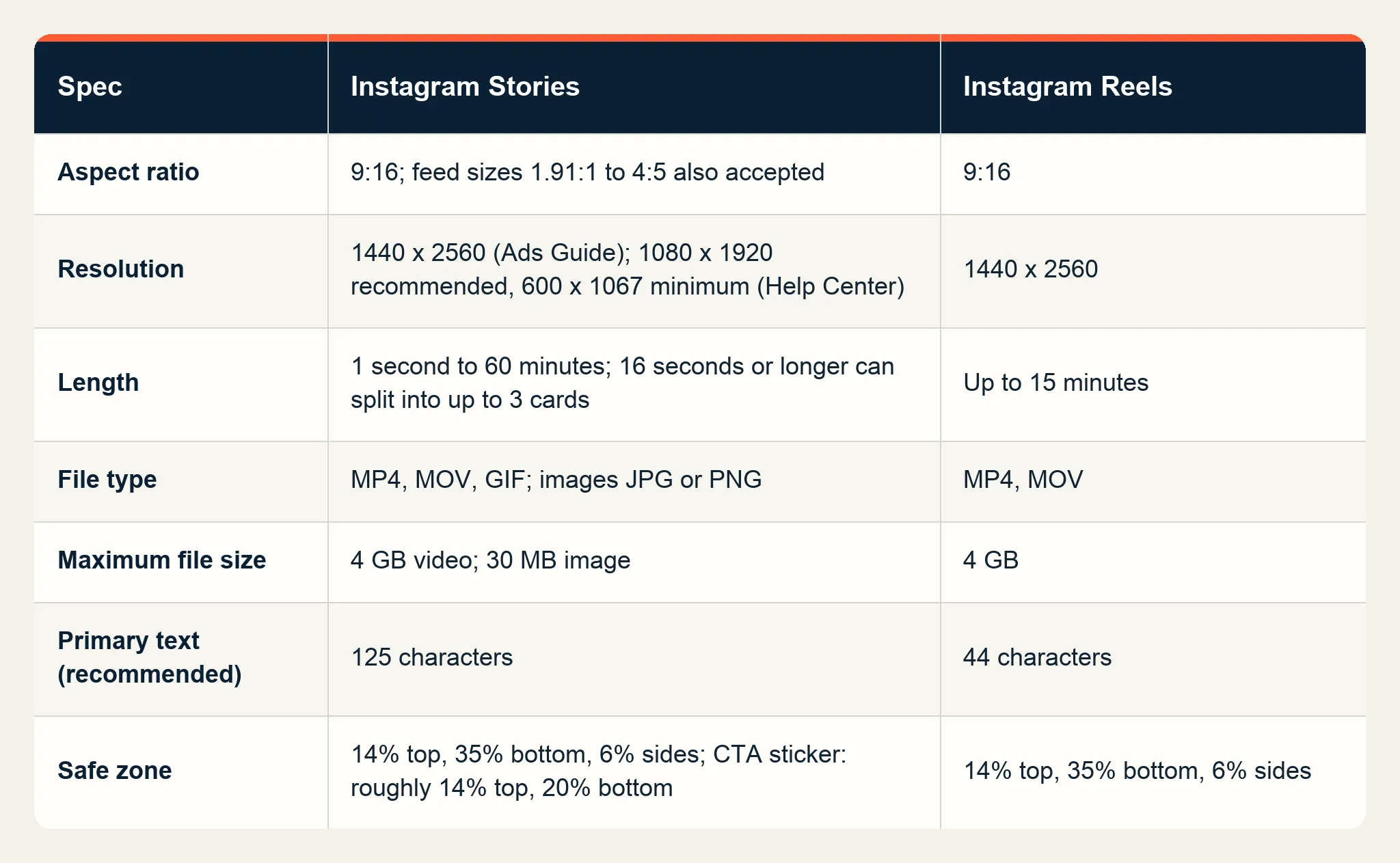
Meta's Ads Guide and Help Center set these specs for Stories and Reels:
- Aspect ratio: 9:16 for both. Stories also accept feed dimensions from 1.91:1 wide to 4:5 vertical.
- Resolution: 1440 x 2560 pixels in the Ads Guide and 1080 x 1920 in the Stories design requirements. Both are 9:16, and 600 x 1067 is the minimum for Stories.
- File type: MP4 or MOV for both, plus GIF for Stories video. Stories images take JPG or PNG.
- Length: 1 second to 60 minutes for Stories video, and up to 15 minutes for Reels.
- Maximum file size: 4 GB for video and 30 MB for a Stories image.
- Recommended primary text: 125 characters for Stories and 44 for Reels.
- Encoding: H.264 compression, square pixels, fixed frame rate, progressive scan, and stereo AAC audio at 128 kbps or more.
Stories play a video ad under 16 seconds in full. A video of 16 seconds or longer can be split into one, two, or three cards chosen for each viewer, and campaigns with a ThruPlay, 2-second video views, or reach goal can offer a Keep Watching option for the rest. Some viewers are shown only the first card, so the product, the offer, and the brand belong in the opening. Story images stay on screen for 5 seconds by default. Starti's TikTok ad specs guide covers the TikTok equivalents.
Instagram Stories and Reels safe zones
To keep text and logos clear of the profile icon, the call-to-action, and the edges of screens taller than 9:16, Meta's Ads Guide recommends leaving 14% of the top, 35% of the bottom, and 6% of each side free of key elements. On a 1080 x 1920 video, that comes to roughly 270 pixels clear above, 672 below, and 65 on each side.
The Stories call-to-action sticker needs less room: Meta's Stories guidance suggests leaving roughly 14% at the top and 20% at the bottom clear, which the 35% margin already covers. Reels ads with disclaimers are the exception and should keep the bottom 40% free, so a master designed at 40% from the start has room for a disclaimer added later. A 9:16 video in Instagram Feed follows the same safe zone guidance as Reels and Stories, which lets one file cover all three placements.
On screens taller than 9:16, the creative is either zoomed to fill the display, which can crop areas outside the safe zone, or shown at 9:16 on a black background. To see the safe zone while building the ad, turn on the Safe zone guardrail in Ads Manager: the safe area is everything inside the yellow overlay.
Reels trending ads
Meta's Reels trending ads run a brand's ad immediately after the most-watched and most culturally relevant reels on Facebook and Instagram. Access opened to all advertisers in 2025, and by October 2026 Meta offered 15 always-on standard topics plus seasonal lineups around the holidays and the start of the football and basketball seasons.
In campaigns that included Reels trending ads, Meta reported that action intent rose more than 5 percentage points against control groups with no campaign exposure, and unaided brand awareness gained an incremental 5 points. Both are brand measures, so the format fits awareness plans and is better judged on lift than on cost per sale.
What Meta recommends for Stories creative
Meta drew these creative best practices for Stories from several research studies:
- Grab attention in the first frame, then use pace to hold it.
- Short, concise scenes tend to beat long, slow ones.
- Put the key message up front and use voice-over or music to enhance it. Starti's guide to writing a commercial script goes deeper on the opening seconds and sound.
- Feature people for awareness, and products for engagement, leads, or sales.
- Text such as "add to cart" at a central focal point can help conversion metrics.
- Skip unnecessary stickers, emojis, GIFs, music stickers, and link stickers.
Producing vertical versions with Starti
Starti AI Studio produces video ads from a brief, and with Video Agent your team signs off each concept, script, and storyboard before production starts. A finished video can be reframed to 9:16, 16:9, 1:1, and 4:5 with subject-aware cropping. The Stories and Reels cut then comes from the same approved ad as the other formats. Approved creatives publish from the asset library straight to connected Meta, Google Ads, and TikTok ad accounts.
Once the ads run, Smart Insight follows one creative across platforms and campaigns, with its spend, engagement, and video completion in the same record.
Book a demo to see how AI Studio prepares vertical ads for Meta.
Frequently asked questions
How do I create Instagram Stories ads?
Create a campaign in Meta Ads Manager, choose an objective, and set the budget, audience, and placements. Then pick an ad format under Ad setup, add media and text, choose Instagram stories under Select a placement to edit, and publish. The ad preview includes a Stories and reels view.
What size is an Instagram Stories ad?
A 9:16 vertical frame. Meta's Ads Guide gives 1440 x 2560 pixels, the Help Center recommends 1080 x 1920, and the minimum is 600 x 1067.
How long can an Instagram Reels ad be?
Up to 15 minutes. Stories video ads can run from 1 second to 60 minutes, and videos of 16 seconds or longer can be split into up to three Stories cards.
What is the safe zone for Instagram Reels ads?
Meta's Ads Guide recommends leaving at least 14% of the top, 35% of the bottom, and 6% of each side free of text, logos, and key elements. On a 1080 x 1920 video, that is roughly 270 pixels clear above, 672 below, and 65 on each side.
What are Reels trending ads?
A Meta ad product that runs a brand's ad immediately after the most-watched and most culturally relevant reels on Facebook and Instagram. Advertisers pick a topic, and Meta offered 15 always-on standard topics in October 2026.
Can Reels ads use licensed music?
No. Reels ads should use original audio or royalty-free music, such as tracks from Meta's Sound Collection.
Do Stories ads and Reels ads use the same creative?
A 9:16 video fits both, and both share the same 14%, 35%, and 6% safe zone in Meta's Ads Guide. Length and recommended primary text differ (125 characters for Stories, 44 for Reels), and Reels ads follow content rules such as no licensed music.