
On this page
- Where Advantage+ creative is set
- Advantage+ creative enhancements for video ads
- Image and catalog ad enhancements
- Enhancements that turn on by default
- How to turn off Advantage+ creative
- Meta's results and AI labels
- Advantage+ creative best practices: When to keep enhancements on
- Building distinct Meta ads with Starti
- Frequently asked questions
Advantage+ creative is the set of enhancements in Meta Ads Manager that adjusts an ad's images, videos, and text into versions its audience is more likely to interact with. Meta's Help Center lists 31 enhancements, and 17 of them use generative AI or offer it as an option. Which ones apply to an ad depends on its format, its placements, and whether it draws on a catalog, and some turn on by default.
For teams that make their own video ads, these settings decide how closely the delivered ad matches the approved file: the crop, the colors, the subtitles, the call-to-action sticker, and the text around the video.
Where Advantage+ creative is set
Each ad carries its own Advantage+ creative settings. In Ads Manager, the enhancements sit in the Enhancements step of ad creative setup, grouped into Media, Text, and Interactivity, with a For review tab that lists inactive enhancements and those that will switch on for the first time when the ad publishes. Meta's setup guide notes that Advantage+ creative can't be turned on with the awareness objective or with dynamic creative. In Meta Business Suite, on desktop and mobile, Advantage+ creative is turned on by default.
Advantage+ creative enhancements for video ads
These enhancements apply to single video ads:
- Video touch-ups (AI): crops or expands a video of any shape to 9:16 or 4:5. Expansion uses AI to generate new pixels in each video frame, covers up to the first 15 seconds, and runs in Facebook Feed and Reels. Cropping, or blurred padding, runs across Facebook Feed and Reels and Instagram Feed, Reels, and Stories.
- Add video effects (AI): raises contrast and makes colors more vivid.
- Video subtitles (AI): writes subtitle overlays from the audio for single video ads with English voiceover in Instagram Reels, in Instagram's standard font and color, with a preview before publishing.
- Translations (AI): translates ad text, and for single video ads with a voiceover, the voice.
- Create sticker CTA (AI): places an image sticker on the call-to-action button, either AI-generated or uploaded.
- Enhance CTA (AI): swaps the call-to-action link sticker for one of Meta's pre-written CTAs and can add promotions such as "Free shipping," in Instagram and Facebook Stories.
- Text generation (AI): writes up to 5 variations of primary text and headline, including versions aimed at personas.
- Relevant comments: shows comments likely to lift performance under the ad on Facebook and Instagram.
- Text improvements (AI): pulls keywords and phrases from the ad copy into overlays, footers, and headlines around the video.
- Flex media: delivers a video made for one placement to other placements where Meta expects better results.
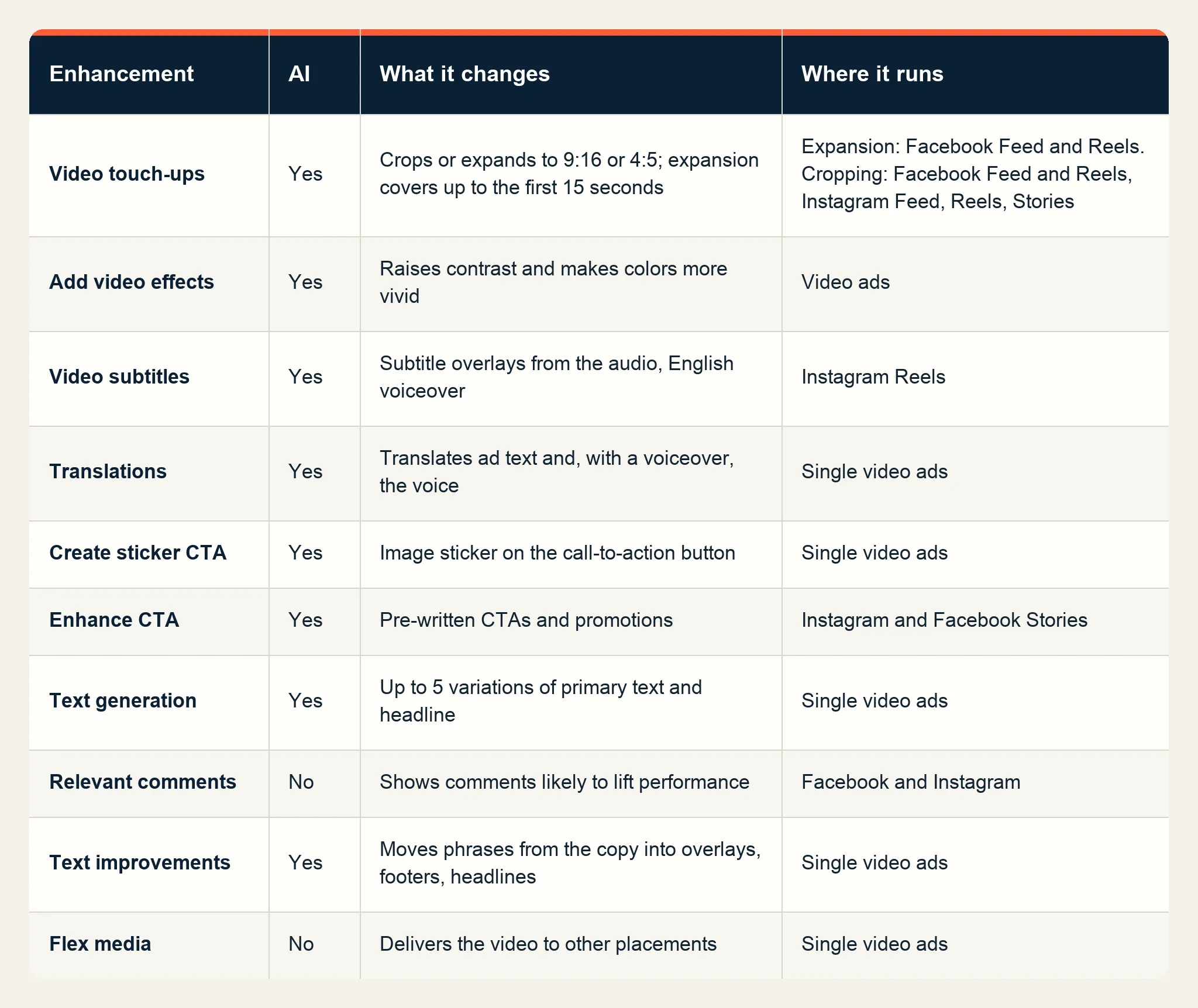
The enhancements that matter most for a finished brand video are Video touch-ups and Add video effects, because they change the picture itself. A 16:9 spot expanded to 9:16 gains generated pixels above and below the original frame.
Image and catalog ad enhancements
Single image ads have their own group. Add animation turns an image into a short video with panning, zooming, and rotation, and can animate the text in it. Image generation creates new versions of an image, with generated text and logo overlays, in two modes: Product images, which keeps a chosen product or person and changes the setting, and Full images, which uses an uploaded image as a reference. Visual touch-ups crops and expands images to more placements, generating pixels where the frame grows. Add overlays shows supplied text on the image, Enhance media text rewrites an image's text overlay without changing the visual, and Adjust brightness and contrast changes those two levels on the image. Add music can attach AI-generated music or music from Meta's library.
Advantage+ catalog ads add Background generation for product images, Image touch-ups that fit product images to 4:5 and 9:16, dynamic overlays with prices or discounts, and a standard info label on catalog carousel and collection ads. Product tags link ad images to catalog items on Instagram Feed. Carousels have Dynamic description, Highlight carousel card, and Profile end card.
Enhancements that turn on by default
Meta's turn-off guide says some enhancements are turned on by default, and the setup guide shows them in the For review tab. Four enhancements in the Help Center carry a default-on note:
- Reveal details over time: for single image or video ads, it surfaces details from the website or app store page after a few seconds of viewing, in Instagram Stories, Facebook Reels, and Facebook Feed.
- Show spotlights: for the same formats, it displays text and images from the website in Instagram Stories and Reels.
- Add product tags: for traffic or sales campaigns with an eligible catalog, it tags matching products in Instagram Feed ads.
- Show summaries (AI): for single image or video ads, it adds an AI-written summary of selling points between the ad footer and the comments in Facebook and Instagram Feed.
A separate setting decides whether features in testing can reach an account. Under Advertising settings, in the Creating ads section, Creative features holds a checkbox named Test new creative features.
How to turn off Advantage+ creative
During ad creation:
- In Ad creative, open Set up creative and go to Enhancements.
- Turn off individual enhancements, or click Customize where an enhancement has options.
- In the Ad preview, click Expand to open Advanced preview, then the Advantage+ creative tab. Some enhancements appear only here, so check both places.
- Click Save, complete the rest of the ad, and publish.
For a live ad, select it in the Ads tab and click Edit. The Advantage+ creative section shows how many enhancements are on; click Edit there, turn off the ones to remove in both the enhancement list and Advanced preview, then save and publish. Meta's Help Center also covers bulk editing enhancements across several ads.
In the Marketing API, most enhancements have their own field under creative_features_spec, and setting its enroll_status to OPT_OUT turns it off; music is set through asset_feed_spec. Since Marketing API v22.0 in January 2025, the old standard enhancements bundle is four separate features: Add overlays, Visual touch-ups, Text improvements, and Relevant comments. Meta's API guide requires ads with AI-generated features to be created as PAUSED, previewed with the creative_feature parameter, and then set to ACTIVE.
Meta's results and AI labels
On its Q1 2026 earnings call, Meta said advertisers using its video generation feature saw more than 3% higher conversion rates in tests. In Q3 2026, nearly 10 million advertisers used at least one of Meta's generative AI ad creative tools, and adoption of its video generation features grew 25% from the previous quarter. On October 6, 2026, Meta announced that generating video from existing static assets in Advantage+ creative is generally available.
Ads with images or videos created or significantly edited by Meta's generative AI tools can carry AI info in the About this ad menu or an AI info label next to the Ad label.
Advantage+ creative best practices: When to keep enhancements on
Four questions settle most cases:
- Is the picture approved frame by frame? Then turn off the enhancements that change the crop, color, and motion: Video touch-ups and Add video effects on video ads, and Visual touch-ups and Add animation on image ads. Keep enhancements off on creator and partnership ads too: the asset under a creator's handle should be the one the creator made.
- Does the account have native versions for each placement? Then upload the 9:16, 4:5, and 1:1 cuts to their placements and keep the touch-ups off.
- Has the copy been approved word for word? Then turn off Text generation, Text improvements, Translations, Enhance CTA, Video subtitles, Enhance media text, and Show summaries, which write or change text in or around the ad.
- Can the result be tested? Run a split test with two ads that share the same creative, one with the chosen enhancements and one without, and compare cost per result over the same dates.
Enhancements vary one asset. When an ad wears out, Meta's creative fatigue guidance asks for a new image or video that is substantially different from the original. Meta's creative diversification guidance goes further and calls for separate assets built for different personas or use cases, which Starti's guide to Meta Andromeda covers.
Building distinct Meta ads with Starti
Inside Starti AI Studio, Video Agent turns a brief into concepts, scripts, and storyboards, and the team approves the idea before production begins. A finished video can be reframed to 9:16, 16:9, 1:1, and 4:5 with subject-aware cropping, and approved creatives publish from the asset library straight to connected Meta ad accounts.
After launch, Smart Insight compares nine creative attributes, such as the opening and visual style, against CTR, completion, and other outcomes on Meta, TikTok, and Google Ads.
Book a demo to see Video Agent and Smart Insight.
Frequently asked questions
What is Meta Advantage+ creative?
Advantage+ creative is a set of enhancements in Meta Ads Manager that adjusts an ad's images, videos, and text into versions its audience is more likely to interact with. Meta lists 31 enhancements and labels 17 of them AI.
What were Advantage+ creative standard enhancements?
Standard enhancements was a bundle that Meta split into individual features in Marketing API v22.0 in January 2025: Add overlays, Visual touch-ups, Text improvements, and Relevant comments. Each one is now turned on or off separately.
How do I turn off Advantage+ creative?
In ad creative setup, go to Enhancements and turn off each enhancement, then open Advanced preview and check the Advantage+ creative tab, where some enhancements appear only. For a published ad, click Edit, open the Advantage+ creative section, make the same changes, and publish.
Is Advantage+ creative on by default?
Some enhancements are turned on by default, and the For review tab in ad setup lists the ones that will switch on when the ad publishes. Meta names Reveal details over time, Show spotlights, and Show summaries for single image or video ads, and Add product tags for traffic or sales campaigns with an eligible catalog. In Meta Business Suite, Advantage+ creative is turned on by default.
Does Advantage+ creative work with video ads?
Yes. Video touch-ups, Add video effects, Video subtitles, voice Translations, Create sticker CTA, Enhance CTA, Text generation, Text improvements, Relevant comments, and Flex media all apply to single video ads.
Does Advantage+ creative add an AI label to ads?
Yes, for ads with images or videos created or significantly edited by Meta's generative AI tools, which can show AI info in the About this ad menu or an AI info label next to the Ad label.