
On this page
Ad creative analysis tools, also sold as ad creative analytics or creative analytics tools, connect campaign results to what is inside each ad, from the opening and visual format to the offer and call to action. Ad platforms report results per ad. Creative analytics groups ads by what they contain and shows whether a kind of opening or offer holds up across many ads before the team puts it into the next brief.
Connect the team's own accounts during a demo or trial to see which networks each feature covers and how many ads stand behind a finding.
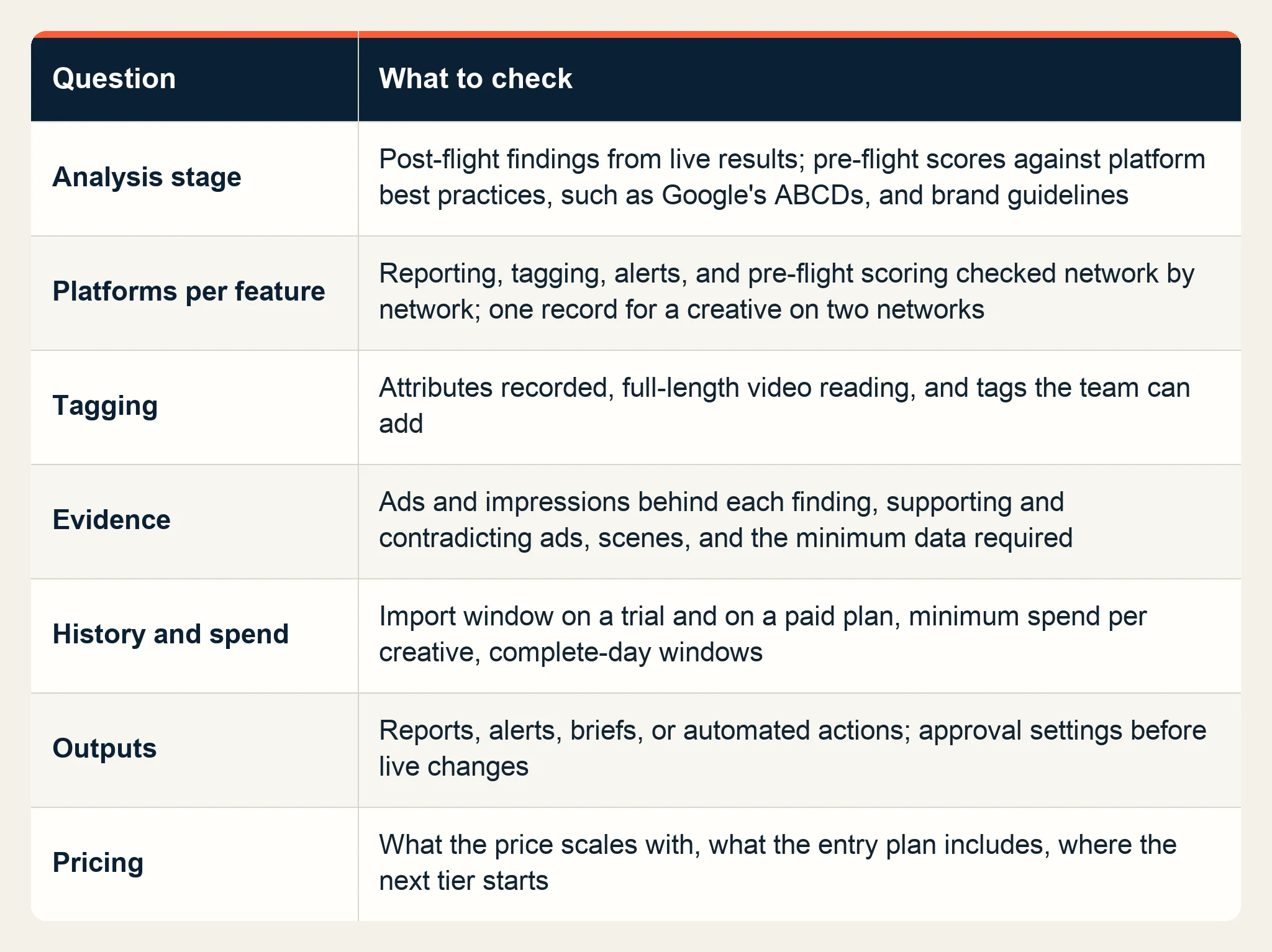
Seven questions for any ad creative analysis tool
1. Does it analyze before launch, after launch, or both?
Post-flight analysis reads the results of ads that have already run and compares groups of them on an outcome, such as click-through rate or video completion. Pre-flight scoring rates an ad before it spends, against platform best practices and brand guidelines, such as the four principles in Google's ABCDs for YouTube video ads: Attention, Branding, Connection, and Direction.
Use pre-flight scores to catch rule breaks before spend, and post-flight findings to choose the next ad to produce.
2. Which platforms does each feature cover?
List every network that takes budget, including app networks and CTV, and check reporting, tagging, alerts, and pre-flight scoring one feature at a time. A tool that reports on four networks but tags creatives on one leaves the creatives on the other three untagged.
Also ask whether the same creative running on two networks appears as one record or two. Separate rows make it hard to judge a concept that runs everywhere.
3. What does it tag, and can the team change the vocabulary?
Tags decide what the tool can find. Check which attributes it records, such as the opening, visual format, product placement, offer, voiceover, music, and call to action, and whether it reads a video across its full length or from a few frames. Then check whether the team can add its own tags for the decisions it argues about most. Starti's creative intelligence article covers why the tag vocabulary matters more than the AI layered on top of it.
4. Which ads stand behind each finding?
Ask to see the ads behind every finding. Each one should show how many ads and impressions it rests on, which ads support it, which ads contradict it, and the scenes where the attribute appears. Find out what minimum data the tool needs before it reports a finding, and what it shows when an account falls short. The four checks in Starti's creative testing guide show how to read that evidence before a pattern becomes the next test.
5. How much history and spend does it need?
Compare how far back the tool imports data on a trial and on a paid plan, whether a creative needs a minimum spend before it is analyzed, and whether date windows use complete days. A two-week import from an account that changes creative once a month leaves few ads to compare.
6. Who acts on a finding?
Outputs range from shareable reports and alerts to written briefs and automated actions, such as pausing ads. Decide who acts on findings, and how they feed the creative strategy, before choosing. If the tool can change live campaigns, review its approval settings. If the creative team acts on findings, look for a brief that names what to keep, what to change, and how the next version will be measured.
7. What does the price scale with?
Pricing can follow monthly ad spend, revenue, impressions, or the number of connected platforms. Ask what the entry plan includes and where the next tier starts. A price tied to ad spend climbs as campaigns scale. Check the tier limit against next quarter's budget.
Match the tool to the team
Weigh the seven questions by who will use the tool:
- Performance teams that ship new variants every week depend most on questions 4 and 6: the evidence behind each finding and briefs editors can use.
- Brand teams with strict guidelines should start from question 1 and ask which of their own rules a pre-flight score can check.
- Agencies need a separate account for each client and reports that a client can read and question.
- App marketers should confirm under question 2 that their app networks and mobile measurement partner are covered.
Run a side-by-side trial
Connect the same accounts to two tools over the same date range. Pick a past test whose result the team already knows, such as an opening change that clearly won, and see whether each tool finds it and shows the evidence. Then time how long it takes to turn one finding into a brief an editor can work from.
What Smart Insight covers
Smart Insight, the creative performance analysis feature in Starti AI Studio, connects campaign results to the content of video ads and analyzes results after ads run. It brings Meta, TikTok, Google Ads, and configured custom networks into one analysis. It keeps the spend, engagement, and video completion of one creative together, even when that creative runs on several platforms and in several campaigns.
Nine creative attributes, including the opening, the call to action, and visual style, are compared on click-through rate, video completion, and other outcomes over a 7-day, 30-day, or 90-day window of complete days. Each finding names the creatives that support it and the ones that contradict it, with the sample size, a confidence level, and timestamped scenes.
Winner, Scaling, Watch, and Fatigue signals point a team to the campaigns and creatives to review first. Reports go out as a link or a PDF, and a finding can become a brief for the existing creative team or continue into production in AI Studio. Smart Insight belongs to AI Studio and can analyze existing ads without the production features.
Book a demo to run Smart Insight on your connected accounts.
Frequently asked questions
What are ad creative analysis tools?
Software that connects ad results to the elements inside each ad, such as the opening, visual format, and call to action, and shows which elements are associated with stronger performance across a group of ads.
How does creative analytics differ from ad analytics?
Ad analytics reports results per ad, campaign, or audience. Creative analytics groups ads by what they contain, such as the type of opening or offer, and compares how each group performs.
Do creative analysis tools work before an ad launches?
Some do. Pre-flight scoring rates an ad before it spends, against platform best practices and brand guidelines. Post-flight tools, including Smart Insight, analyze results after ads run.
How much data does creative analysis need?
Each group needs enough ads and impressions that one outlier cannot decide the comparison. Ask each vendor for the minimum it applies before reporting a finding.
What should you check when choosing a creative analytics tool?
Check the analysis stage, platform coverage for each feature, the tag vocabulary, the evidence behind each finding, data needs, outputs, and what the price scales with. Then run two tools side by side on the same accounts and date range.