On this page
- The Short Version, For People Scrolling
- What Even Is Harness Engineering?
- Layer 1: Don't Give the LLM a Blank Canvas - Give It a Platform
- Layer 2: The Context Supply Chain - Good Output Starts With Good Input
- Layer 3: Skills Aren't Prompts - They're Structured Knowledge
- Layer 4: Three Gates Before Anything Ships
- Layer 5: The Agent Reviews Its Own Work
- What's Next
One of our sub-agents, the motion graphics agent, had two problems. It broke 40% of the time. And the other 60% of the time, it was ugly.
Let me back up. Our platform handles multiple video types: motion graphics, lifestyle montages, live action, and more. This particular sub-agent writes React + Remotion code to produce motion graphics videos.
Give it a brief, "30-second fintech app promo, dark theme, kinetic typography, phone mockups", and it generates working JSX with animations, 3D scenes, the works.
When it works, it's magic. The problem was, those two words, "when it works", were doing a lot of heavy lifting.
Problem one: reliability. The "broke 40% of the time" part. Missing elements. Broken layouts. Phone mockups overlapping text. GSAP timelines fighting React's render cycle. Code that wouldn't even parse. Classic LLM chaos.
Problem two: aesthetics. The "ugly 60% of the time" part. Even when the code ran perfectly, the output loved dark blue-to-purple gradients. Every layout looked like a SaaS dashboard — center the headline, add a geometric shape, fade to black. Zero creative range. Zero taste.
You've seen this with AI image generators, and with AI coding. The model converges on a median aesthetic, the most statistically common thing in its training data. Fine for cat pictures. Catastrophic for ads that need to stop the scroll.
We didn't set out to solve both at once. But as we kept building, we found the same set of practices, "constraints, curated context, structured knowledge, layered validation, self-review", naturally fixed both. Reliability went up because the model had less to get wrong. Quality went up because the model had better things to reference. Same harness, two wins.
This post walks through those practices. Not a better model. A better harness.
The Short Version, For People Scrolling
We build a multi-agent platform that creates video ads: motion graphics, lifestyle montages, live action, and more. This post dives into our motion graphics sub-agent, but the harness engineering principles apply across all of them. The core challenge isn't "can AI write motion graphics code", it's "can AI do it reliably at production scale, with output that actually looks good enough to ship."
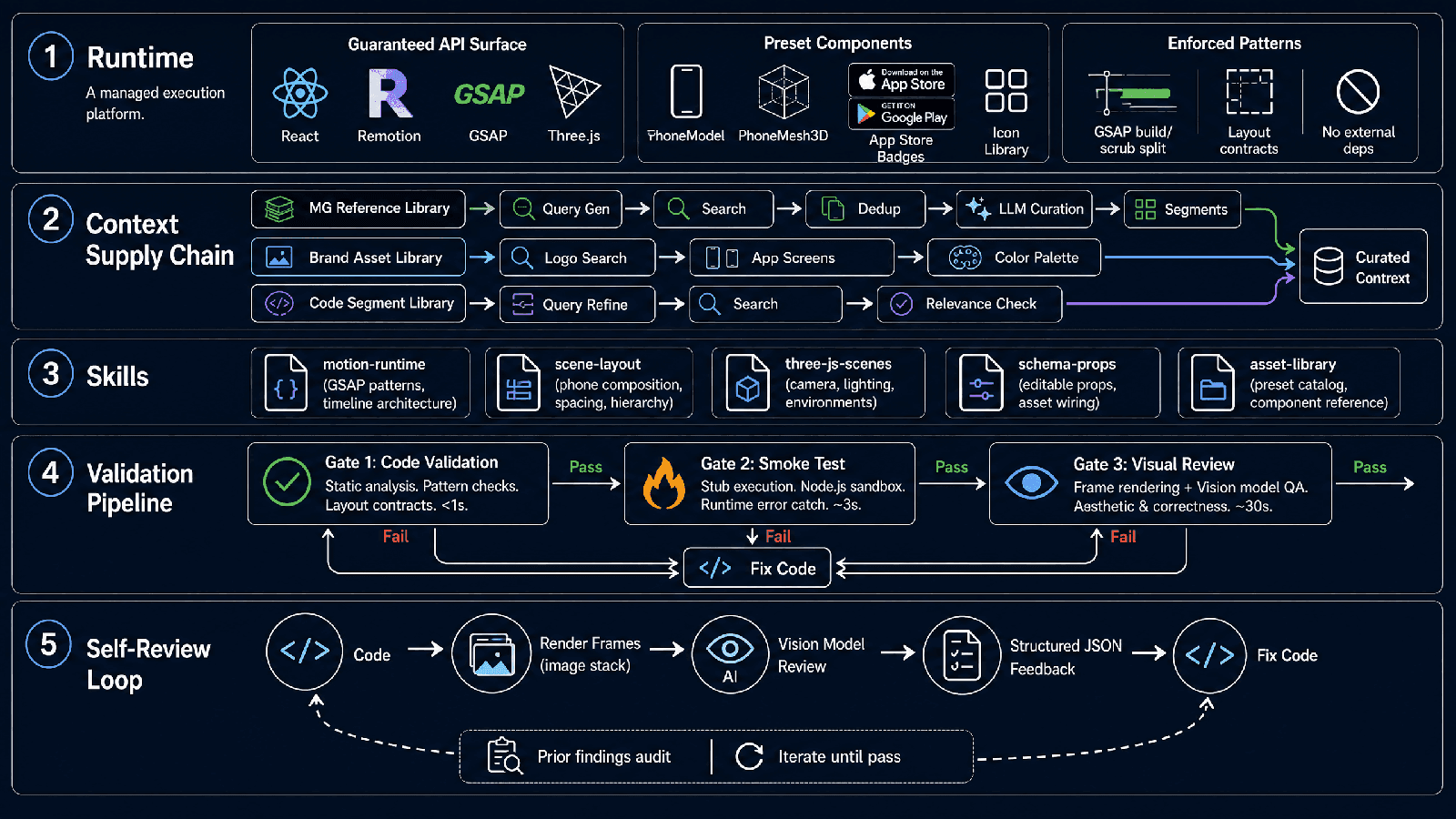
Our answer: harness engineering — the discipline of wrapping an unpredictable LLM with constraints, context, and feedback loops so the whole system becomes dependable. Here's the five-layer stack we built:
- A purpose-built runtime — the LLM codes against a managed platform, not a blank canvas
- A context supply chain — we feed it curated visual references and brand assets, not a vague brief
- Structured skills — production knowledge encoded as loadable reference documents
- A validation pipeline — three automated quality gates before anything ships
- A self-review loop — the agent renders its own output and asks a vision model "does this look right?"
If you're building AI agents that need to produce reliable creative output — not just chat — this one's for you.
What Even Is Harness Engineering?
If you've been following AI agent discourse in 2026, you've heard the term. But it's worth defining clearly, because it's easy to mistake for "better prompting."
Harness engineering is everything that isn't the model.
The model is the reasoning core: creative, unpredictable, occasionally brilliant, occasionally useless. The harness is the scaffolding around it: the constraints that keep it on track, the context that gives it something to work from, the feedback loops that catch its mistakes, the quality gates that prevent bad output from reaching users.
Think of it like this: a Formula 1 engine is incredible, but it doesn't win races by itself. It needs a chassis, suspension, brakes, telemetry, a pit crew, race strategy. The harness is the whole car minus the engine.
The 2025 playbook was "find the best model." The 2026 playbook is "build the best harness." Because models are commoditizing fast, GPT-5.x, Claude 4.x, Gemini 3.x, they're all converging. What won't commoditize is the engineering discipline to make them reliable in production.
So let me walk you through our harness.
Layer 1: Don't Give the LLM a Blank Canvas - Give It a Platform
Most AI coding demos work like this: hand the LLM a blank file and say "build me a video player app." The LLM generates imports, picks libraries, sets up a build system. Sometimes it works. Sometimes it imports a library that doesn't exist or has a breaking API change.
We took the opposite approach.
Instead of a blank canvas, we built a managed execution environment specifically for motion graphics. Think of it like iOS development: you don't start from scratch, you build against a guaranteed SDK surface. You know exactly which APIs are available, what arguments they take, what they return. No dependency hell, no version conflicts, no "this function was deprecated three months ago."
Our runtime provides:
A Guaranteed API Surface
The agent doesn't write imports because the platform already provides everything. React, Remotion (the video framework), GSAP (animation), Three.js (3D), and React Three Fiber are pre-injected into scope. The agent's job isn't to configure a development environment, it's to compose with known, stable primitives.
This isn't a restriction. It's a contract. The runtime says: "these capabilities are always available, always at these versions, always with this behavior." The agent says: "great, I'll build on top of that." Both sides know what to expect.
Preset Components
Phone mockups. App store badges. 3D coin animations. These are the Lego blocks of motion graphics ads, every video uses some combination of them, but they're tedious to build from scratch every time.
We pre-built them as preset components. The agent doesn't write <PhoneModel> from scratch, it just uses it, with props for position, scale, tilt angle, screen content. The component auto-injects into the code when referenced. The agent focuses on composition and timing, not boilerplate.
Enforced Coding Patterns
Some patterns are correct in web development but break under Remotion's render model. GSAP timelines built in useMemo instead of useEffect. Selector-based animations without gsap.context(). require() calls that fail at render time.
The runtime contract encodes these rules, not as suggestions, but as validated invariants. Write a GSAP timeline in useMemo, and the code validator catches it before rendering. This is the difference between "the model should know better" and "the system guarantees correctness."
The principle: Reliability comes from reducing undefined behavior. When both the agent and the platform agree on exactly what's available and what's valid, the output becomes predictable enough to validate, render, and ship.
Layer 2: The Context Supply Chain - Good Output Starts With Good Input
Here's a thought experiment. Ask an LLM with no context to "design a motion graphics ad for a fintech app." What do you get?
Dark blue background. Purple accent gradient. A centered headline in white. A floating geometric shape (hexagon or circle, your choice). Maybe a spinning 3D coin if the model is feeling adventurous. It's not wrong, it's just the statistical median of every SaaS landing page and crypto whitepaper the model has ever seen. It's the creative equivalent of plain oatmeal.
This is the "median aesthetic" problem. Left to its own devices, an LLM converges on the most common thing. Not the best thing. Not the brand-appropriate thing. Not the thing that makes a viewer stop scrolling.
Now give that same LLM: three reference videos from your library showing exactly how successful fintech ads handle phone UI reveals, a brand style guide with exact hex colors, the client's actual app screenshots and logo assets.
The output quality gap is massive. And it has nothing to do with the model, it's entirely about input quality.
This is Layer 2 of the harness: the context supply chain. We don't just constrain what the LLM can output (Layer 1). We control what it sees as input. Because when the model has concrete, curated examples to work from, it stops guessing and starts composing.
Stage 1: Visual Reference Discovery
We maintain a curated library of production-grade motion graphics videos, each with timestamped segments and keyframe annotations. Instead of dumping raw search results into the agent's context, a dedicated workflow handles the full curation: an LLM generates three distinct search queries targeting visual style, narrative structure, and production technique; results are merged and deduplicated; another LLM selects the best 1–3 reference videos with explicit reasoning, prioritizing diversity; and timestamped segments with keyframe URLs are extracted so the agent gets precise visual anchors, not entire videos.
Stage 2: Brand Asset Resolution
In parallel, the system searches the brand asset library: logos, app screenshots, UI elements, approved color palettes. The agent never has to guess what the client's logo looks like or which shade of blue to use.
This matters more than you'd think. LLMs have a tendency to hallucinate brand details — wrong logo placement, slightly-off colors, invented app UIs. When you're producing ads for paying clients, "close enough" isn't close enough.
Stage 3: Code-Level Reference Lookup
When the agent actually implements a specific scene, it has access to a second, finer-grained search: a code-segment library. "Show me how other videos handled split-screen phone UI with kinetic typography", the query gets refined by an LLM, searched, and the results are strictly evaluated by another LLM acting as curator. It rejects partial matches, topic-only overlaps, and results with a fundamentally different composition. Only genuinely useful references make it through.
The principle: Don't ask the LLM to generate from scratch when you can give it something to work from. Good references don't constrain creativity, they anchor it in what's proven to work. The agent still makes creative decisions about composition, timing, and motion. It just makes them from a starting point that's already on-brand and style-appropriate.
Layer 3: Skills Aren't Prompts - They're Structured Knowledge
If you've worked with LLM agents, you know the pattern: you write a long system prompt with instructions, examples, rules, gotchas. It works for a while. Then the model ignores half of it.
The problem is that a system prompt is a single, flat text blob. Everything competes for attention. Critical rules get buried. The model "reads" it but doesn't retrieve from it effectively.
We took a different approach: Skills as loadable reference documents.
A Skill is a structured document the agent loads on demand, not a wall of text it sees once and forgets. Each Skill covers one domain, with a main guide (SKILL.md) plus supporting reference files:
- motion-runtime — GSAP patterns, timeline architecture, the build/scrub split rule (build the timeline once, scrub separately — never put frame counters in construction deps). Common pitfalls and how to avoid them.
- scene-layout — Phone composition heuristics. Split layouts: keep the phone at 20–24% width with safe column gaps. Stacked layouts: phone at 18–22% width, reserve title band height. Dominant cropped phones must feel intentional, not accidental.
- three-js-scenes — Camera setup, lighting presets, environment maps. When to use ThreeCanvas vs flat composition. Default Environment preset="city" unless you have a reason not to.
- schema-props — Editable prop patterns, asset assignment workflows, how to wire fileKey props to runtime .url accessors.
- asset-library — Complete preset catalog, component reference, phone model guide with exact sizing formulas.
Each Skill is what a senior motion designer knows after years of experience — the unwritten rules that separate "it technically works" from "this looks professional." By making those rules explicit and loadable, we turn one-shot generation into repeatable, quality-controlled output. The model stops converging on the median aesthetic because it's operating inside a defined design space with concrete constraints.
And because Skills are separate files (not one giant prompt), the agent loads only what's relevant to the current task. Building a 3D scene? Load three-js-scenes. Working on layouts? Load scene-layout. The context window stays focused, and domain knowledge doesn't compete for attention.
Layer 4: Three Gates Before Anything Ships
Okay, so the agent has a great runtime, curated references, and loaded skills. It writes code. Now what?
Now we validate. Not once, three times, at three different levels. Each gate is faster and cheaper than the next, so we run them in order and fail early.
Gate 1: Code Validation (Static Analysis)
The moment the agent writes or edits code, a validator runs. It checks:
- Surface-level correctness: Is export default function present? Are injected globals being accidentally redeclared? Any require() calls that will break at render time?
- Pattern compliance: Are GSAP timelines being built in useMemo (wrong) or useEffect (correct)? Are phone layouts using the right footprint reservation variables? Are preset components being used directly via JSX rather than destructured from objects?
- Layout contracts: Split text layouts must reserve textColumnWidth and phoneFootprintWidth. Stacked layouts need titleBandHeight. Logo scenes need logoBlockHeight and copyBlockHeight. The validator enforces these — not as suggestions, but as hard rules with clear error messages.
Gate 1 runs in under a second. If it fails, the agent gets a precise error and fixes the code before moving on.
Gate 2: Smoke Test (Stub Execution)
Static analysis catches structural problems, but it can't catch runtime errors. For that, we run the code — but without the overhead of a full Remotion render.
We built a Node.js smoke test harness. It creates a fully stubbed environment: React hooks return mock values, GSAP tweens are no-ops, Three.js objects are proxies, Remotion's useCurrentFrame() returns a configurable frame number. The code executes in this sandbox, and we catch:
- Broken prop access patterns (cannot read property of undefined)
- Missing component exports
- GSAP timeline initialization errors
- 3D scene misconfigurations (e.g., ThreeCanvas with wrong dimension types)
Gate 2 runs in a few seconds. It catches the class of bugs that would otherwise only surface during an expensive render.
Gate 3: Visual Review (Vision Model QA)
Code can be syntactically perfect and runtime-safe, and still look terrible. Text overlapping phone screens. Awkward empty space. Elements offscreen. Animation timing that doesn't read.
For this, we render actual frames using Remotion Lambda and send them to a vision model for review.
The review isn't a vague "does this look good?", it's structured, with a detailed prompt that includes:
- The full user brief and chat history
- The current code, schema, and props
- Rendered still frames at key beats
- Prior unresolved review findings (for re-reviews)
- A runtime contract reference (so the model doesn't flag "missing imports" for injected globals)
The vision model returns structured JSON:
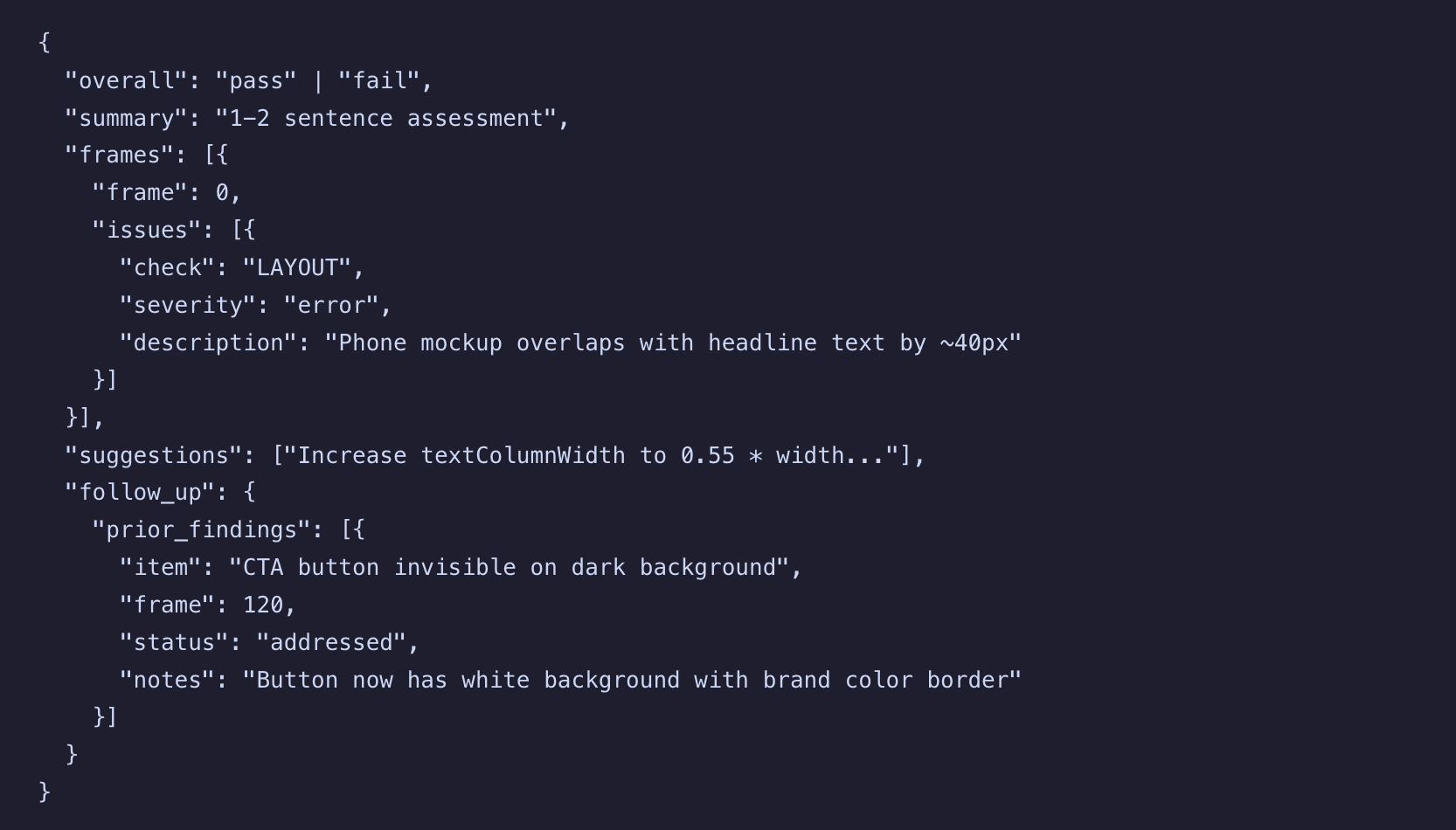
The follow_up section is key, it means the reviewer remembers what it flagged last time and explicitly confirms whether each issue was fixed. This turns review from a one-off check into a true iterative loop.
Layer 5: The Agent Reviews Its Own Work
The visual review isn't just a final gate, it's a feedback loop. When the review fails, the agent gets the structured feedback and fixes the issues. Then it re-renders and re-reviews.
This is where reliability and aesthetics converge. The vision model doesn't just check "are all the elements present?", it judges composition quality, visual balance, color harmony, spacing, hierarchy, readability. It asks the same questions a human art director would: does this look intentional? Is the primary message visually dominant? Does the layout feel composed rather than assembled?
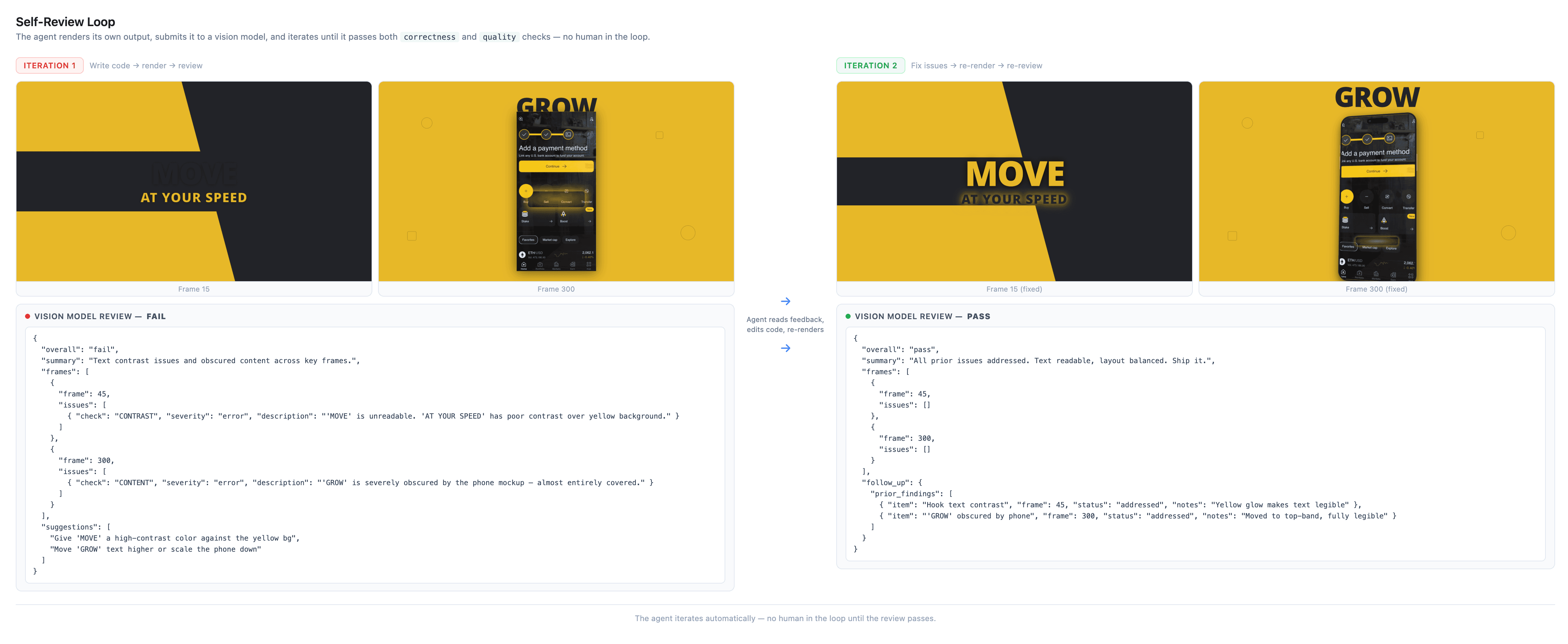
Here's what a typical iteration looks like:
1. Agent writes code → validation passes → smoke test passes
2. Agent renders stills at frames 0, 45, 90, 135, 179
3. Vision model reviews: FAIL — "Headline text is cropped on the right edge. Phone mockup looks flat against the background, needs shadow or depth. CTA button invisible on dark background at frame 90. The composition feels left-heavy with too much dead space on the right."
4. Agent reads the feedback, edits the code: widens text column, adds boxShadow to phone, adds white background to CTA button, rebalances layout
5. Agent re-renders same frames → same vision model reviews: PASS — "All prior issues addressed. Layout is now clean and balanced. Ship it."
Notice what happened there: the review caught bugs (cropped text, invisible button) and aesthetic problems (flat phone, unbalanced composition). Same loop, both problems. The agent isn't just debugging — it's iterating on design quality.
The agent isn't just generating code, it's looking at its own rendered output and asking "did I actually build what was asked, and does it actually look good?"
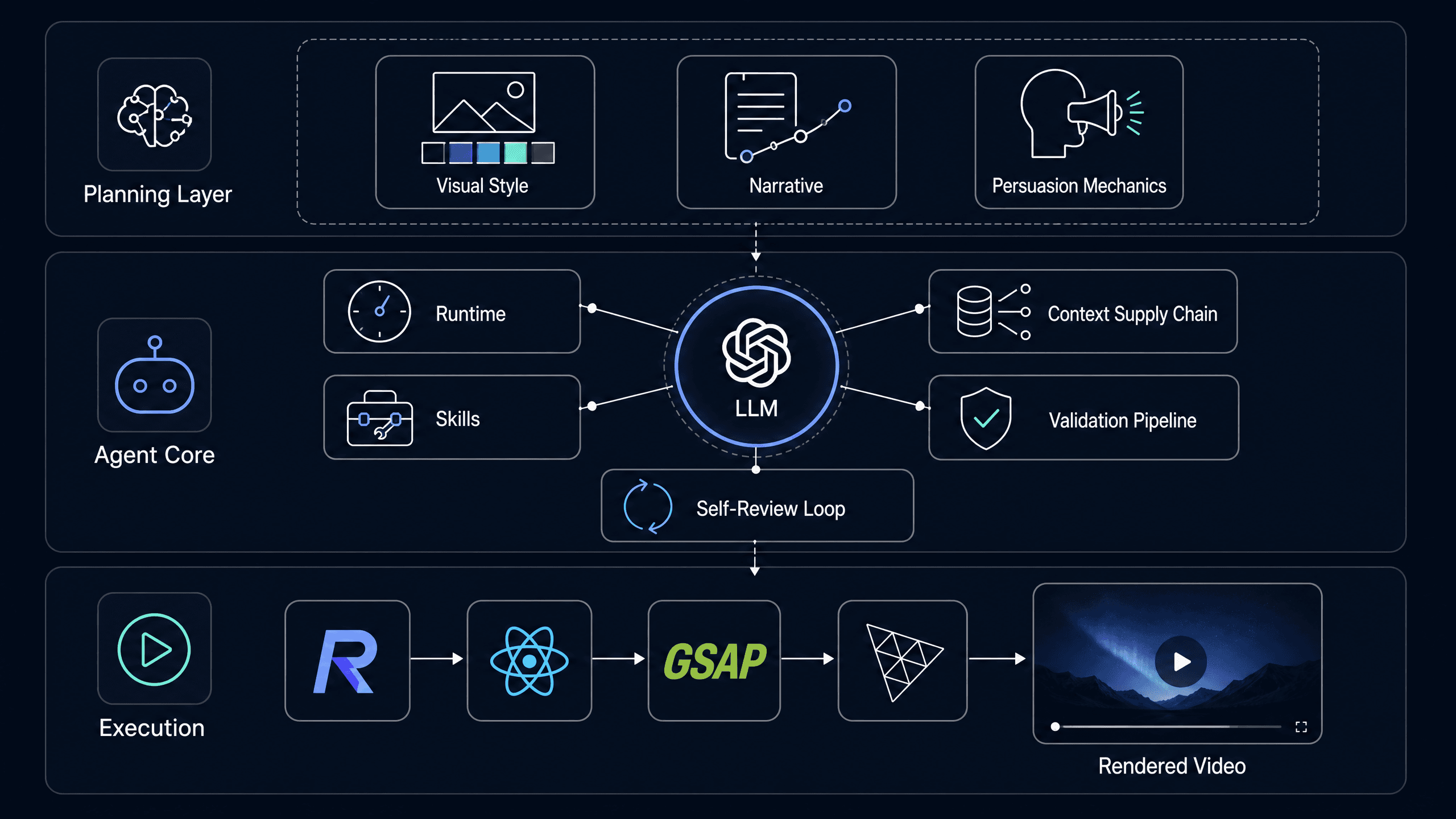
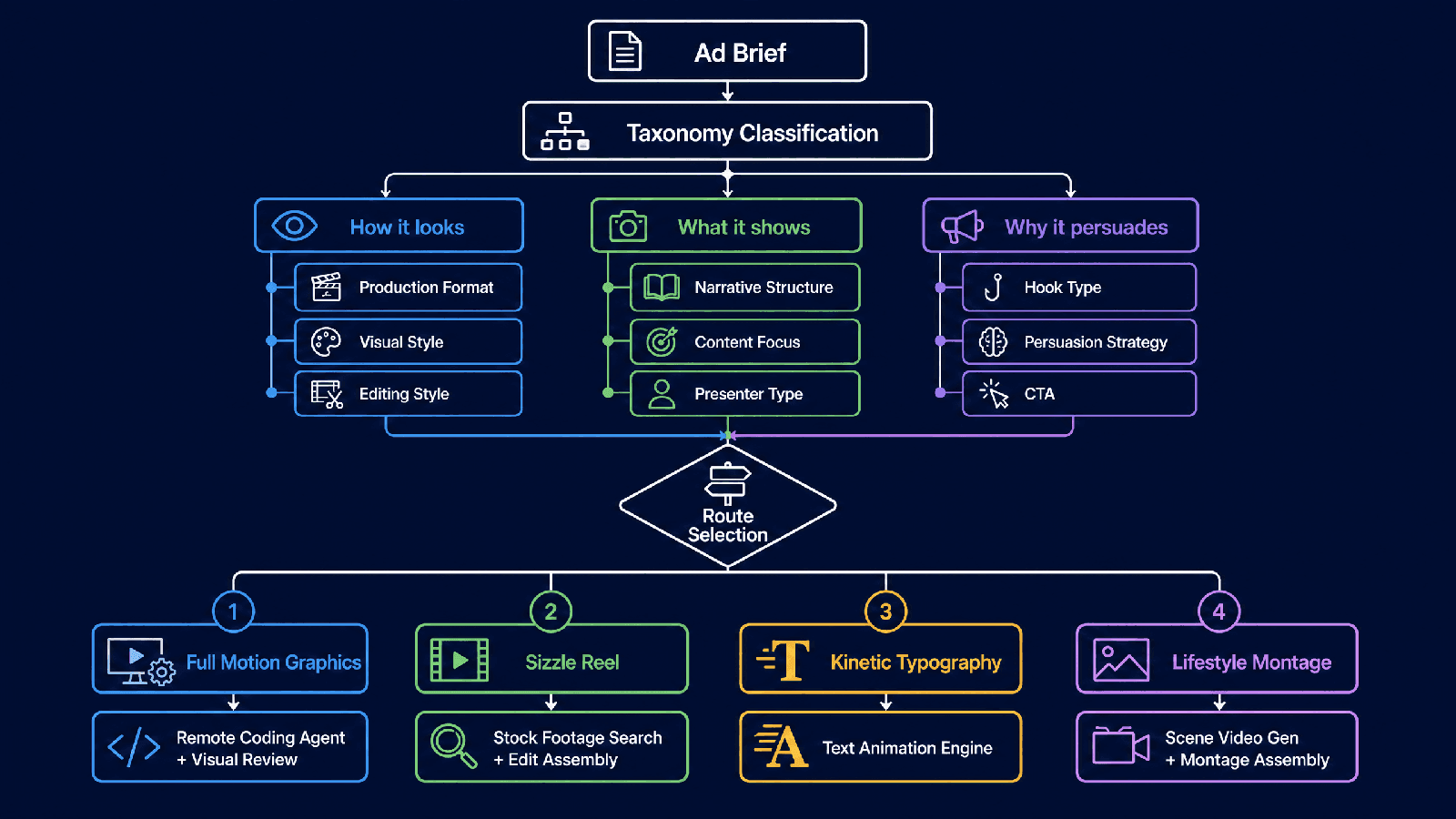
The Planning Layer: Why We Don't Just Start Coding
Everything I've described so far is one execution layer, the motion graphics sub-agent's code generation pipeline. But before any sub-agent gets invoked, there's a higher-level decision that's arguably more important than the execution itself.
What kind of video are we making?
Video ads aren't one thing. A motion graphics sequence, a lifestyle montage, a feature demo, a kinetic typography explainer, and a live action / narrative sequence are all different video types — but their production paths are completely different. For motion graphics, our agent generates video through code (React + Remotion). For other video types, it may use generative models. Different tools, different sequences, different quality criteria.
If you start coding before you know which path to take, you'll waste cycles on the wrong approach. So our planning layer classifies every video request across three dimensions first:
- How it looks: Production format (Motion Graphics / Live Action / 3D Animation), visual style (Cinematic / Minimalist / Playful), editing style (Fast Cut / Beat Sync / Kinetic Typography), platform format (9:16 vertical / 16:9 horizontal)
- What it shows: Narrative structure (Problem-Solution / Feature Showcase / Lifestyle Montage), content focus (Product Demo / Brand Story / App UI Walkthrough), presenter type, creative devices
- Why it persuades: Hook type (Curiosity / Problem / Visual), persuasion strategy (Social Proof / FOMO / Aspirational Identity), value proposition, CTA type
This isn't academic taxonomy for taxonomy's sake. It's a routing system. The classification determines:
- Which agent workflow to invoke
- What tool sequence to follow
- What reference videos to pull from the library
- What validation rules to apply
- What the success criteria look like
The planning layer is what turns "make me a video ad" into "execute this specific production path." And the more we encode these paths, through skills, references, and workflow orchestration, the more the system makes the right call automatically.
This is the real moat, by the way. Anyone can call an image model or a video model. Knowing which tools to use, in what order, for which type of ad, that's the part that models can't figure out on their own. It has to be designed.
Putting It All Together
Here's the full architecture, end to end:
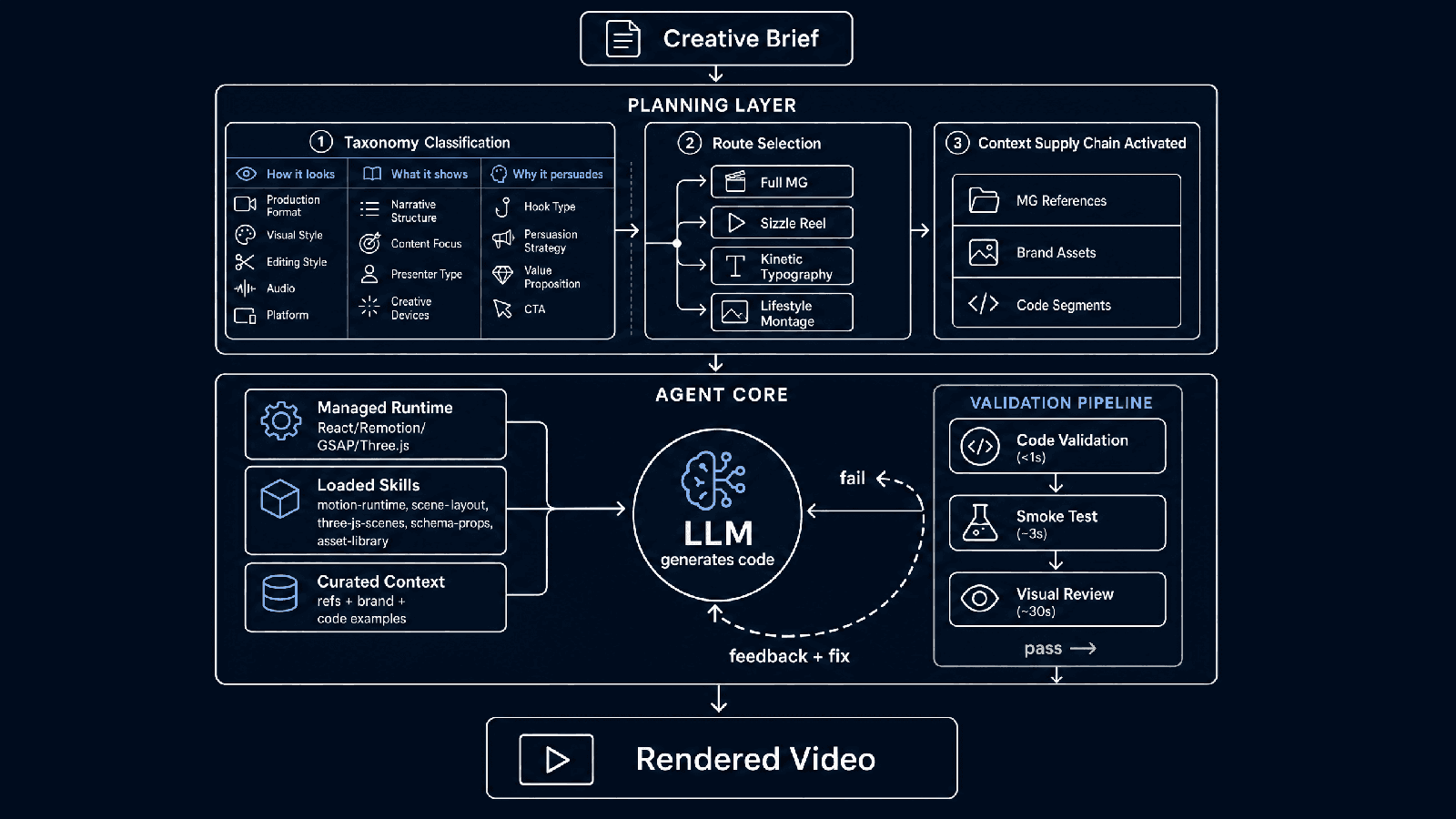
The entire system runs on a cloud agent runtime, orchestrated with a multi-agent framework that gives us fine-grained control over middleware, tool management, and the validation pipeline.
Is it overengineered? For a demo, absolutely. For a system that needs to work when a paying customer clicks "generate" at 2 AM with nobody watching? That's just what it takes.
So, Did It Work?
Remember those opening numbers - 40% broken, 60% ugly?
The render-review loop caught enough failures that this sub-agent rarely breaks now. When it gets something wrong, it sees it and fixes it. That feedback loop turned "when it works" from a caveat into a given.
On the quality side, most generations now land in a range we're comfortable showing clients. The output isn't winning design awards, but it's also not the dark blue-to-purple SaaS template anymore, it's varied, on-brand, and a starting point a human doesn't have to throw away.
We'll take that trade.
What We Learned (The Part You Can Steal)
Building this system taught us a few things that generalize beyond motion graphics:
1. Constraints create reliability
The more you specify the execution surface, the more predictable the output. Don't give the LLM a blank canvas. Give it a platform with a guaranteed API, preset components, and validated patterns. Less freedom, more reliability.
2. Good output starts with good input
The biggest quality jump we saw wasn't from a better model, it was from adding the context supply chain. Curated references + brand assets + code examples = output that's on-brand and on-style by default. This is how you beat the "median aesthetic", don't ask the model to invent. Show it.
3. Skills beat prompts
Long system prompts are fragile. The model forgets, ignores, or misapplies rules buried in a wall of text. Loadable, domain-specific reference documents are more reliable — and they're easier to maintain, test, and version independently. They also encode taste: layout heuristics, composition rules, motion timing guidelines. Taste doesn't have to be magic, it can be documented.
4. Layered validation catches what single-pass generation misses
Code validation, smoke testing, and visual review catch different failure modes at different costs. Run them in order, cheapest first, and fail early. The visual review is especially powerful: the model literally looks at what it made and judges it. And crucially, it judges both correctness and quality, bugs and bad design in the same pass.
5. The planning layer is the real moat
Models are getting better and cheaper every quarter. What won't commoditize is knowing which tools, in what order, for which type of output. That knowledge, "encoded in taxonomy, routing, skills, and reference libraries", is the durable competitive advantage.
What's Next
This post focused on motion graphics, one production path, one harness. But the same principles apply across every video type we build. Each format gets its own skills, reference library, and validation rules. The harness is modular.
If you're building similar systems, I'd love to compare notes.
The future of AI products will not belong to the companies with the smartest models. It will belong to the companies with the best harnesses: the best constraints, the best retrieval, the best validation, the best taste systems, and the best operational loops.
Models generate. Harnesses ship.